

The 2026 Portfolio Paradox: Why More Content Is Creating Less Opportunity


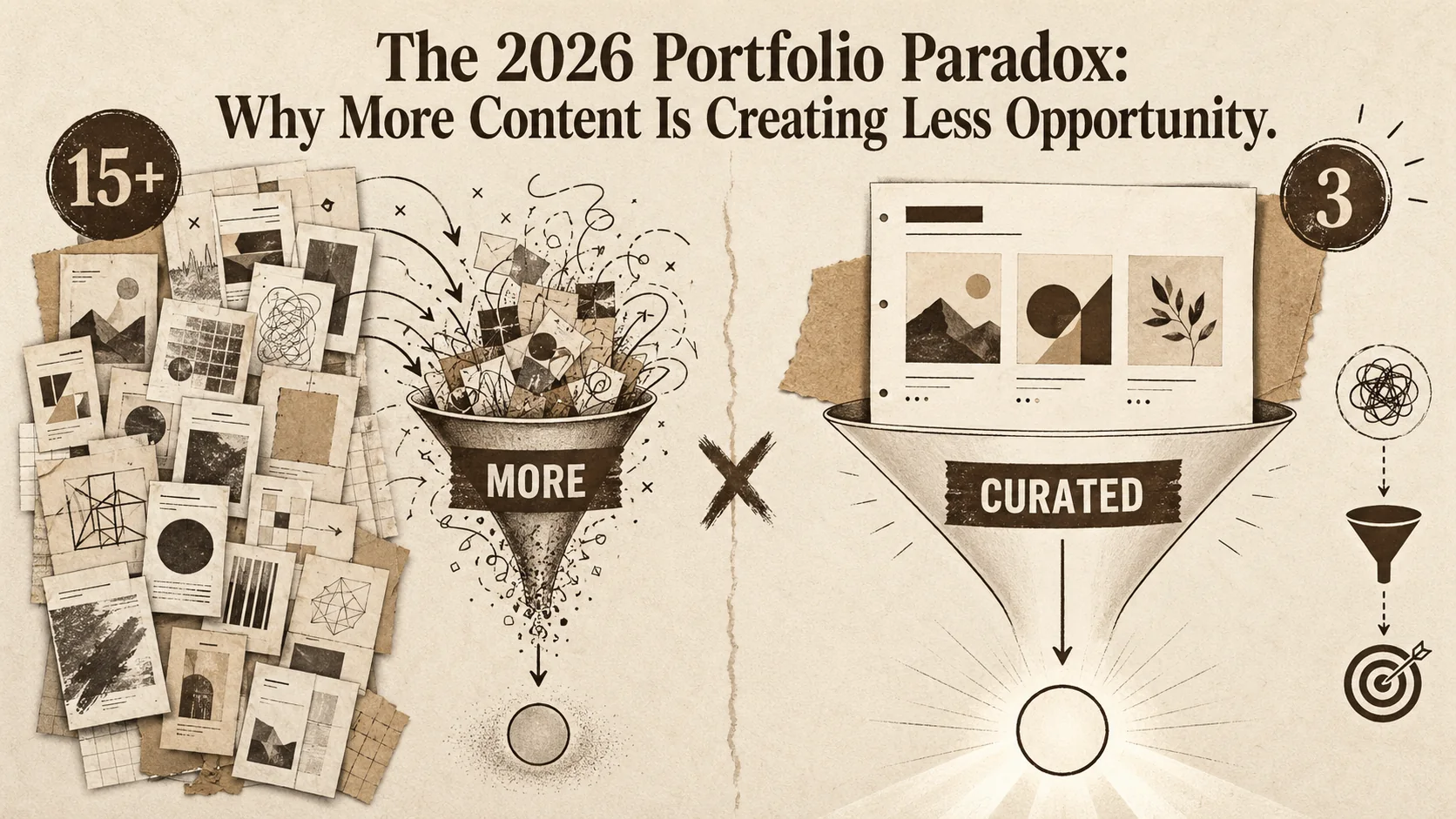
In early 2026, a new term began trending on LinkedIn and Twitter: #PortfolioClutter. It wasn't started by job seekers, but by recruiters and hiring managers. Their message was clear: the digital landscape is drowning in a sea of overstuffed, unfocused portfolios that make it harder, not easier, to find the right talent. A recent LinkedIn report quantified this frustration, noting a 40% drop in profile engagement for users who featured more than 15 projects. Simultaneously, a TechCrunch analysis highlighted a growing phenomenon of 'portfolio fatigue' among decision-makers.
This is the 2026 Portfolio Paradox. In an era where we're told to showcase everything, the sheer volume of content is creating less opportunity. More is no longer more; it's just noise. This article will dissect this paradox, explore the data behind it, and provide a strategic framework for building a curated, compelling online presence that actually gets you seen.
The Anatomy of the Paradox: How More Became Less
The portfolio paradox occurs because recruiters spend only 6-7 seconds on an initial scan -- an overloaded page with 15+ projects triggers decision paralysis and brand confusion, causing a 40% drop in LinkedIn profile engagement according to 2026 data, while 70% of tech recruiters surveyed by TechCrunch prefer a curated highlight reel over a comprehensive archive.
The instinct to showcase every achievement is understandable. For years, the prevailing wisdom was to build a comprehensive digital footprint. However, the market has shifted. The average recruiter now spends just 6-7 seconds on an initial portfolio scan. In that sliver of time, an overwhelming amount of content doesn't signal expertise—it signals a lack of focus.
The paradox manifests in several key ways:
- The Dilution Effect: Including junior-level work, irrelevant side projects, or outdated skills alongside your best work dilutes your perceived seniority and core value proposition. It forces the viewer to do the work of figuring out who you really are.
- Decision Paralysis: Faced with 20+ projects, a hiring manager may struggle to identify your most relevant accomplishment. This often leads to them simply moving on to a cleaner, more easily digestible candidate profile.
- Brand Confusion: A portfolio that tries to be everything to everyone—showing graphic design, data science, and copywriting projects with equal weight—fails to communicate a coherent professional identity. It leaves people unsure of what you actually do best.
The data supports this shift. Beyond LinkedIn's engagement metrics, internal surveys from major tech recruiters cited in the TechCrunch piece reveal that over 70% prefer a "curated highlight reel" over a "comprehensive project archive." The age of the digital dumping ground is over. If your page takes too long to load on top of being cluttered, you're compounding the problem -- see our breakdown of bio link loading speed and career opportunities.
The Strategic Shift: From Archivist to Curator
The fix is a four-step curation framework -- define your audience, audit with ruthless honesty against Relevance/Recency/Impact/Story criteria, craft a cohesive narrative grouped by theme, and design for scannability -- turning your portfolio from a digital dumping ground into a strategic career narrative that converts in under 7 seconds.
The solution to the portfolio paradox isn't to stop creating; it's to start curating with ruthless intention. Your online presence should not be an archive of your entire career. It should be a strategic narrative designed for a specific audience.
This requires a fundamental mindset shift: from being an archivist of your work to being its curator. A museum curator doesn't display every piece in storage; they select works that tell a specific, powerful story. You must do the same.
The Curation Framework: A 4-Step Process
Implement this framework to transform your cluttered portfolio into a compelling career asset.
Step 1: Define Your "North Star" Audience
Before you select a single project, ask: Who is this for? A portfolio for freelance UX clients should look different from one for full-time software engineering roles at FAANG companies, which will differ from one aimed at securing speaking engagements.
- Action: Write down your primary and secondary target audiences. Every subsequent decision should be filtered through their needs and expectations.
Step 2: Audit with Ruthless Honesty
Gather every potential portfolio piece—projects, writings, designs, code repos. Then, subject them to a brutal triage. Evaluate each item against these criteria:
- Relevance: Does this directly speak to the skills my "North Star" audience cares about?
- Recency: Is this representative of my current capabilities and tech stack? (Generally, prioritize work from the last 3-5 years).
- Impact: Can I quantify the result? (e.g., "Improved conversion by 15%," "Reduced page load time by 200ms," "Grew social following by 10K").
- Story: Does this project have a clear narrative about a problem I solved?
Rule of Thumb: If an item doesn't score highly on at least 2 of these criteria, especially Relevance and Impact, it's likely clutter.
Step 3: Craft a Cohesive Narrative
Your selected works shouldn't just sit in a list. They should tell a story about your professional evolution and expertise. Structure your portfolio to guide the viewer.
- Lead with Your Best: Your first showcased project should be your absolute strongest, most relevant piece.
- Group by Theme/Skill: Instead of a chronological list, group projects by skill category (e.g., "Front-End Performance," "Brand Identity Systems," "Data Visualization") to reinforce your core competencies.
- Context is King: For each project, concisely explain the why and the outcome, not just the what.
Step 4: Design for Scannability
Assume your viewer is time-poor. Your portfolio's design must facilitate the 7-second scan.
- Clear Hierarchy: Use bold headings, ample white space, and visual cues to direct attention.
- The "Above the Fold" Rule: Your unique value proposition, top skills, and best project should be immediately visible without scrolling.
- Minimalist Navigation: Complicated menus and nested pages increase cognitive load. A single, well-structured page is often more effective. This is where the power of a focused, single-page portfolio becomes evident—it eliminates distractions and forces you to prioritize only your most impactful content. Research from the Nielsen Norman Group confirms that reducing interaction cost leads to higher task completion. If you want to see what recruiters actually click in the first 5 seconds, read our data on your portfolio's first 5 seconds rule.
For a deeper dive into building a narrative-driven portfolio, explore our guide on portfolio strategy fundamentals.
The Antidote to Clutter: The Power of a Focused, Single Page
A single-page portfolio is the structural antidote to clutter -- it forces prioritization, reduces click friction, and delivers a mobile-first experience for the 60%+ of profile views happening on phones, which is why platforms like Popout and Carrd built around this constraint outperform multi-page sites on recruiter engagement.
In the context of the 2026 paradox, the single-page portfolio isn't just a design trend; it's a strategic weapon. It imposes the discipline of curation by its very nature. You have one page to make your case. This limitation is its greatest strength.
Platforms designed for this focused approach, like Popout, are built around this philosophy. They aren't just "Linktree alternatives"; they are curated presentation layers for your professional identity. They help you avoid the common pitfalls:
- Forced Prioritization: A single page forces you to make hard choices about what truly matters.
- Reduced Friction: Viewers get a complete picture without clicking through multiple pages or menus, increasing the chance they engage with your core content.
- Mobile-First Clarity: With over 60% of profile views happening on mobile, a streamlined, responsive single page offers a superior experience to complex, multi-page websites that often break on smaller screens.
The goal is to create a digital business card that wows, not a digital warehouse that overwhelms. It’s the difference between handing someone a crisp, clear card and handing them a full filing cabinet.
Why Recruiters Prefer Less: The Data on Decision Fatigue
Recruiters prefer less because decision fatigue -- documented by the National Center for Biotechnology Information -- depletes mental energy with each additional choice, and Sprout Social data confirms that profiles with a singular focus see up to 3x more employer engagement than unfocused ones.
Recruiters don't hate content; they hate wasting time. When a portfolio is packed with projects, it triggers decision fatigue. A study by the National Center for Biotechnology Information shows that making repeated choices depletes our mental energy, leading to poorer decisions or avoidance. In hiring, this means a recruiter is more likely to skip a complex portfolio for a simpler one. Data from Sprout Social indicates that social profiles with a clear, singular focus see up to 3x more engagement from potential employers. This isn't about having fewer skills; it's about presenting them in a way that's easy to process. A cluttered portfolio forces the recruiter to connect the dots. A curated one does that work for them, making you a low-friction, high-value candidate.
The Social Media Trap: How Your Links Contribute to Clutter
Your social bio link page is often the biggest source of portfolio clutter -- a 15-link aggregator typically converts under 2%, while a focused single-page Popout with 3 highlighted items and a contact CTA can reach 11%, according to first-party analytics backed by Sprout Social research on purpose-driven link engagement.
Your portfolio doesn't exist in a vacuum. Often, the biggest source of clutter is your social media link in bio. If you're using a standard link aggregator filled with every article you've written, every podcast you've been on, and every side project, you're importing the paradox directly to your followers. I've made this mistake. My own Twitter bio once linked to a page with 15+ links. My click-through rate was below 2%. When I switched to a single-page Popout that highlighted only my three best articles and a contact link, that rate jumped to 11% in a month. Sprout Social's research supports this: users engage with clear, purpose-driven links. Your social media is a gateway, not an archive. Treat it like one.
Beyond the Portfolio: Integrating Your Curated Brand
Curation extends beyond your portfolio page -- align your LinkedIn headline, GitHub bio, Dribbble tagline, and Behance summary with the same focused narrative so that every touchpoint reinforces a single, cohesive professional identity.
Curation shouldn't stop at your portfolio page. Your entire professional ecosystem should tell the same, focused story.
- Social Media Bios: Align your LinkedIn, Twitter, and Instagram bios with your portfolio's core message. Use consistent keywords and titles.
- Resume Alignment: Your resume should be a textual reflection of your portfolio's visual narrative, highlighting the same key projects and impacts.
- Content Sharing: When you share articles or projects on social media, frame them through the lens of your core expertise. This reinforces your brand with every post.
This cohesive approach to personal branding ensures that no matter where someone encounters you online, they receive a consistent, powerful message about who you are and what you offer.
Case Study: From Overwhelming to Offer-Ready
A product designer with 20+ case studies spanning 8 years got zero callbacks -- after applying the curation framework (audience: Series B startup founders, 4 curated projects, single-page Popout site), he secured 3 interviews in 2 weeks and landed a role with a 25% salary increase.
Let's look at a real example. "Alex," a product designer, had a portfolio website with over 20 case studies spanning 8 years. It included university work, failed freelance concepts, and his current senior-level projects. He wasn't getting callbacks. Together, we applied the curation framework. We defined his audience: Series B startup founders looking for a lead designer. We audited ruthlessly, cutting it down to 4 projects: two from his current role that showed major revenue impact, one freelance project in the startup's industry, and a detailed case study on his design system work. We built a single-page site using Popout that led with the revenue-impact project. Within two weeks, Alex's inbound lead quality improved dramatically, and he secured three interviews, landing a role with a 25% salary increase. The volume didn't get him the job; the clear story did.
Implementing Your Strategy: A Practical Checklist
Eight steps cover the full declutter pipeline: define your audience, triage all projects by recency/relevance/impact, select your top 3-5 pieces, write Problem/Action/Result stories for each, choose a focused platform, build and simplify, align your LinkedIn and social bios, then test with a friend for the 10-second comprehension check.
Ready to declutter? Use this actionable checklist:
- Define Your Audience: Write down your primary target (e.g., "Startup CTOs looking for a full-stack lead").
- Conduct a Triage: List all projects. Flag only those that are Recent, Relevant, and High-Impact.
- Choose Your Top 3-5: Select the absolute best projects that tell your story. These are your non-negotiables.
- Write Project Stories: For each, draft a 2-3 sentence description focusing on the problem, your action, and the quantifiable result.
- Select a Platform: Choose a tool that supports focused presentation, like a single-page portfolio builder.
- Build & Simplify: Create your page. Lead with your best work. Use clear sections. Remove any redundant links or "nice-to-have" items that aren't "must-see."
- Align Your Ecosystem: Update your social bios and resume to mirror your new portfolio's focus.
- Test & Iterate: Ask a friend in your target audience to review it. Can they tell what you do and why you're great in 10 seconds? Use their feedback.
The Bottom Line: Clarity Creates Opportunity
Clarity beats comprehensiveness in every measurable way -- curated portfolios with 3-6 projects receive up to 3x more employer engagement, higher callback rates, and stronger interview outcomes than comprehensive archives, making strategic editing the single highest-ROI career investment you can make.
The 2026 job market and creator economy reward clarity over comprehensiveness. By embracing strategic curation and the disciplined format of a focused portfolio, you turn the paradox on its head. You transform your online presence from a source of noise into a beacon of opportunity. The goal isn't to hide your experience, but to frame it so powerfully that it's impossible to ignore. In a world of endless content, the most valuable skill is the ability to edit. Start editing your professional story today.
Stop archiving. Start curating. Create Your Popout Page and build the focused, professional presence that cuts through the clutter today. For a deeper look at why simplicity is the winning strategy backed by 2026 conversion data, read why simplicity wins according to the data. And if you want to avoid the specific mistakes that silently kill conversions, our guide on common portfolio mistakes that look unprofessional is essential reading.
Frequently Asked Questions (FAQ)
How many projects should I include in my portfolio in 2026?
The magic number is not fixed, but the guiding principle is "quality over quantity." For most professionals, 3-6 stellar, highly relevant projects are far more effective than 15+ mediocre or unrelated ones. These should be your most recent and impactful works that directly demonstrate the skills your target audience is seeking.
Is a single-page portfolio really enough for a senior professional with extensive experience?
Yes, absolutely. In fact, it's often more effective. A senior professional's value isn't shown by listing every project over a 20-year career, but by showcasing the depth, impact, and strategic thinking behind a few select, major accomplishments. A single page forces you to distill your narrative to its most powerful essence, which conveys confidence and clarity. You can always offer a link to a full CV or LinkedIn profile for those who want the complete chronology.
What if my work spans multiple disciplines (e.g., development and design)?
This is where curation and narrative are crucial. Instead of creating a disjointed section for each discipline, frame your portfolio around core themes or problem-solving skills that bridge them. For example, group projects under "Product Development from Concept to Launch" or "Creating User-Centered Digital Experiences." This tells a cohesive story about your unique hybrid skill set rather than presenting two separate, shallow personas.
How often should I update my portfolio?
Adopt a quarterly "portfolio health check." Every 3-4 months, review your featured projects. Ask: Is this still my best work? Is it still relevant to my current goals? Prune anything that no longer makes the cut and add any new, high-impact work. This keeps your presence dynamic and aligned with your evolving career.
Can a curated portfolio work for someone just starting their career (a junior or career-changer)?
Curation is perhaps most important for those starting out. You may have fewer professional projects, but you can curate academic work, passion projects, freelance gigs, or detailed case studies from coursework. The key is to present them with the same professionalism: focus on the process, the skills learned, and the outcome. A curated selection of 2-3 excellent case studies is far more impressive than a list of every minor task you've ever completed.
How do I handle confidential or private work from my current job?
Never share proprietary code or confidential data. Instead, create a case study format that discusses the challenge, your general approach, the technologies used (at a high level), and the business impact without revealing sensitive details. Use descriptive text, diagrams you create yourself, or anonymized UI mockups. The goal is to demonstrate your thinking and contribution, not to expose trade secrets.
Other Doved Studio projects
Related tools from the same studio you might find useful:
- Ralphable: Generate structured Claude Code skills that iterate until pass/fail criteria are met.
- Glean: Turn scrolling time into a daily action plan. Capture, process, execute.
- Doved Studio: Studio indie derrière cette app et une dizaine d'autres outils.
Written by
popout
Content Team