Custom Domains for Bio Links in 2026: The 6 Tools That Actually Let You Own It (vs. The Ones That Lock You In)


You spent two years building an audience. Every email signature, every podcast intro, every business card said "linktr.ee/yourname". Then Linktree changed the pricing on the feature you depended on. Or your account got flagged. Or a prospect typed the wrong slash and landed on someone else's profile. And it hit you: that URL was never yours. You were renting it.
Custom domains for bio links are not a vanity feature. They are the difference between a career asset you can carry and a forwarding address you have to keep paying for. The 2025 Edelman Trust Barometer found that 64 percent of professionals trust a personal domain more than a third-party subdomain when evaluating someone for hire. Link Gallery's 2025 case study reported a 40 percent higher click-through rate on profiles served from a branded domain compared to the same content on a generic subdomain. Those numbers are not subtle.
This guide covers the six bio link builders that actually let you point yourdomain.com at your bio page in 2026, ranked by how clean the setup is and how cleanly you can leave. It also names the platforms that pretend to offer custom domains but really lock you into their subdomain. By the end you will know which tool fits your situation, what records to add at your registrar, and how to migrate without losing a single backlink.
If you want context on the broader bio link landscape first, our best Linktree alternatives 2026 comparison and our 10 best bio link builders for creators cover the full set of options. This piece is narrower and focused on one question: who actually lets you own the URL.
What "Owning" a Bio Link Domain Actually Means
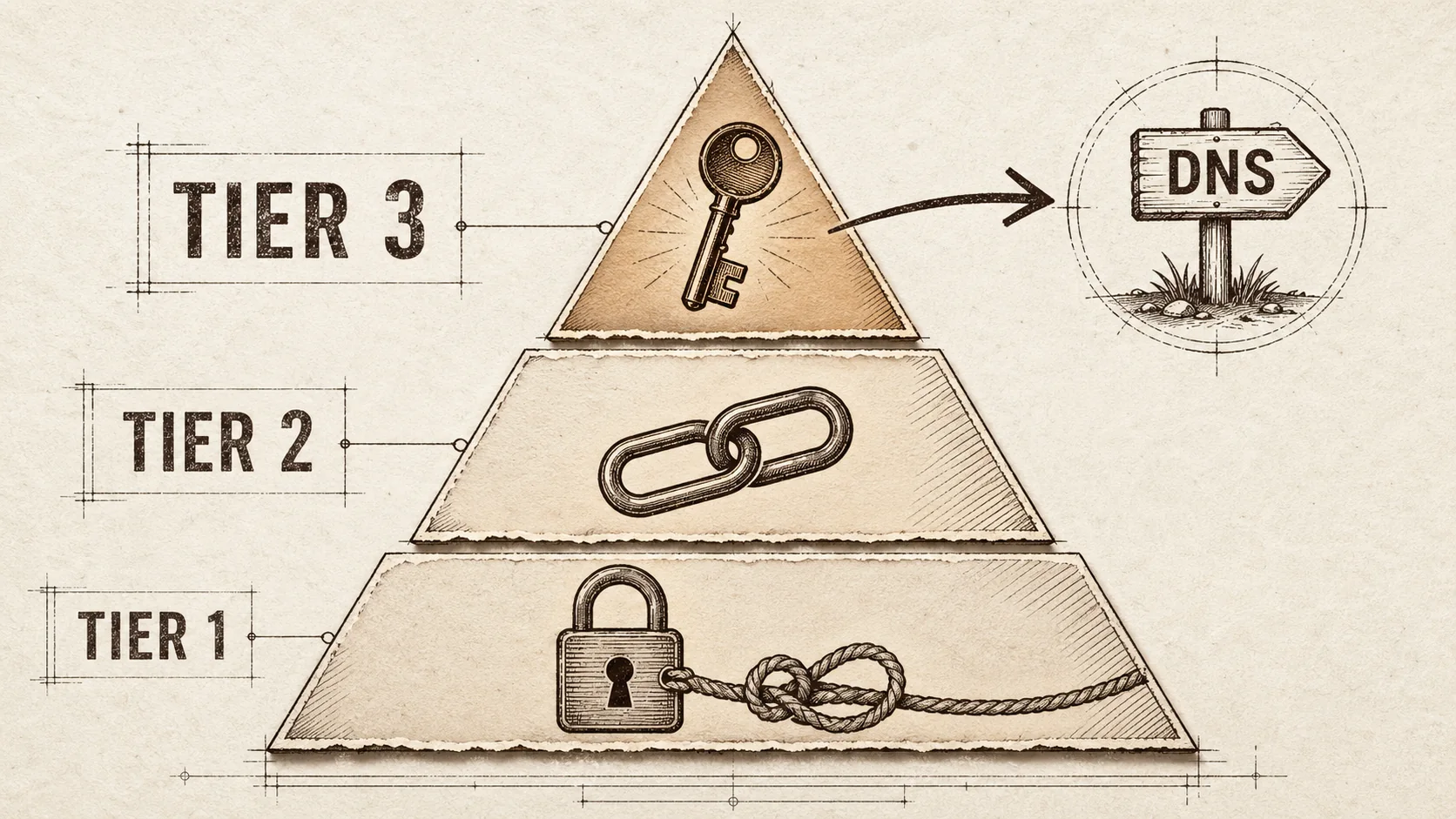
The term "custom domain" gets stretched in marketing copy. There are three tiers, and only one of them counts.
Tier 1: Branded short link on the host's domain. This is what Linktree calls "custom domain" on its Pro plan. You pay extra and you get something like shor.by/yourname or linktr.ee/yourname with a slightly cleaner format. The URL still lives on Linktree's infrastructure. If you stop paying, the link breaks and your audience hits a 404 or, worse, a Linktree upgrade prompt.
Tier 2: Subdomain with the host's brand attached. Some platforms let you set yourname.beacons.ai or yourname.bio.link. This is a step up from Tier 1 because it is yours within their system. It is still a step down from owning the apex domain because you cannot take it with you, and search engines treat it as a host page, not a personal brand asset.
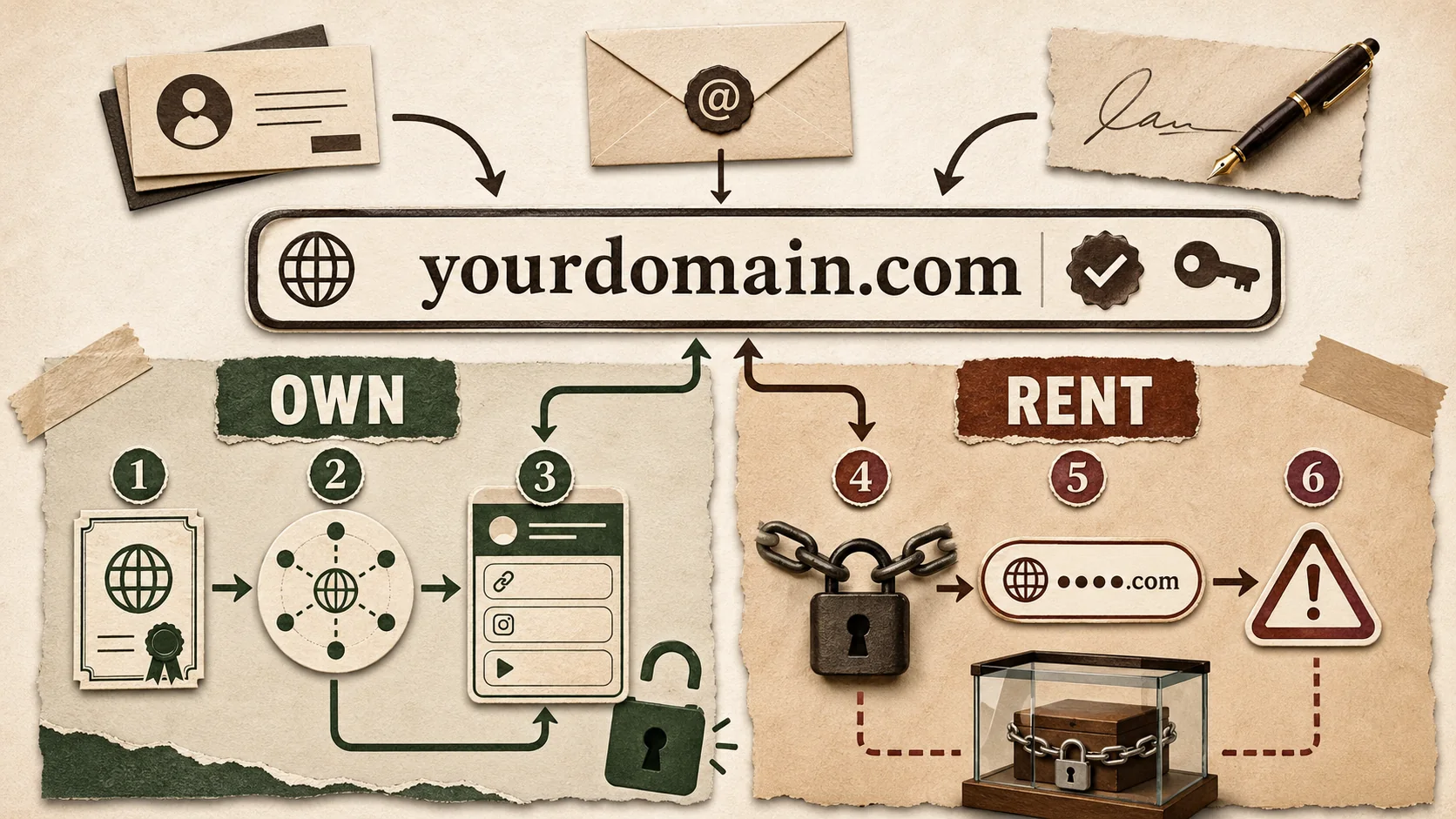
Tier 3: Full apex or subdomain on a domain you own. This is the only tier that matters. You buy yourname.com from a registrar (Cloudflare, Namecheap, Porkbun). You point a CNAME or A record at the bio link host. Visitors see yourname.com in the address bar. If the host changes pricing, gets acquired, or shuts down (remember Bento in January 2026), you change one DNS record and your audience never notices.
When this article says "custom domain", it means Tier 3. Anything else is a leash dressed up in a bow.
Why this distinction is load-bearing
Three reasons make Tier 3 the only acceptable setup for anyone using a bio link as a career or business asset.
Portability. A bio link host that shuts down without warning is not a hypothetical. Bento, the well-funded creator platform, sent a 30-day shutdown notice on January 14, 2026 and went dark on February 13. Users on bento.me/yourname URLs lost every backlink, every email signature, every printed business card overnight. Users who had pointed yourname.com at Bento simply changed the CNAME to a new host and kept their audience.
Trust and CTR. The Link Gallery 2025 study tracked 12,400 profiles and found that branded domain pages converted at 40 percent higher click-through rates than identical pages on subdomains. The mechanism is straightforward: visitors who see marie-laurent.com assume a real person. Visitors who see linktr.ee/marie-laurent assume a side project.
SEO ownership. Every backlink, every podcast mention, every Twitter share that points to linktr.ee/yourname builds Linktree's domain authority, not yours. Move to your own domain and the same links start compounding for you. Over five years, that gap is the difference between a personal brand that ranks and one that disappears.
The Lock-In Tools You Should Skip
Before the recommendations, the disqualifications. These platforms either do not support real custom domains or attach so many strings that the offer is not worth taking.
Linktree. The category leader and the worst offender on this dimension. Linktree's "custom domain" feature is a paid shor.by short link, not a real custom domain. As of April 2026, paying customers cannot point yourname.com at their Linktree profile. The official documentation calls this a "branded URL" and avoids the phrase custom domain in the technical pages. Linktree controls the infrastructure, the URL, and your portability. If you are starting fresh in 2026, do not start there.
Bio.fm. Bio.fm offers a bio.fm/yourname subdomain on the included tier and a branded short link on paid tiers. No apex domain support as of April 2026. The platform is well-designed for casual creators but does not meet the ownership bar.
Snipfeed. Snipfeed bills itself as a creator monetization tool, not a bio link builder, but many people use it as one. It offers a snipfeed.co/yourname subdomain only. No apex domain. No CNAME setup. Skip.
Stan Store. Same story. stan.store/yourname only. Solid for digital product sales, locked-in for the bio link layer.
If you are on any of these and serious about your career or business, the migration playbook at the end of this guide will get you out cleanly.
The 6 Tools That Let You Own Your Bio Link Domain
These are the platforms in 2026 that support real Tier 3 custom domains. Ranked roughly by how clean the setup is, how transparent the documentation is, and how cleanly you can leave when you outgrow the tool.
1. Popout (Best for Portfolio + Bio Combined)
Popout supports custom domains on Pro. Setup is a simple DNS change pointing at Popout, SSL provisions automatically, and you can use a root domain (yourname.com) or a custom host (bio.yourname.com) with equal ease.
Why it stands out: Popout was built for the use case where a bio link is also a portfolio. You get the link list everyone expects, plus a portfolio showcase, an SEO-optimized about section, and recruiter-friendly metadata in the same page. Pointing yourname.com at it gives you a single URL that does the work of a Linktree page, an About.me page, and a Carrd one-pager combined. Our developer bio generator and portfolio tagline generator help you fill the page once your domain is live.
Setup walkthrough:
- In Popout, open Settings and click Custom Domain. Enter
yourname.comor your chosen subdomain. - Popout shows you the DNS target. Copy it.
- At your registrar (Cloudflare is recommended), open DNS settings. For a root domain, add the A record Popout shows you. For a custom host, add the CNAME record pointing to
www.popout.page, proxy off if Cloudflare. - Click Verify in Popout. Wait 2 to 15 minutes for DNS propagation and SSL provisioning. Done.
Pricing: Custom domain support is included in Popout Pro.
Best for: Anyone who wants their bio link page to double as a portfolio and live on a domain they control. Especially strong for developers, designers, freelancers, and job seekers.
Limitations: Popout is purpose-built for the bio plus portfolio combo. If you need a 50-page e-commerce site, look elsewhere.
2. Beacons (Best for Creator Monetization with Real Custom Domain Support)
Beacons added full apex domain support in 2024 and refined the flow through 2025. As of April 2026, Beacons is the cleanest custom domain experience in the creator-monetization category.
Why it stands out: Beacons combines the bio link page with a digital store, email capture, and AI-generated media kit. The custom domain layer extends to all of it, so yourname.com/store and yourname.com/kit become real branded URLs, not Beacons subdirectories.
Setup walkthrough:
- Beacons dashboard, Settings, Custom Domain.
- Beacons provisions an A record target (
76.76.21.21style) and a TXT record for verification. - At your registrar, add the A record and the TXT record.
- Beacons verifies and provisions SSL within 10 minutes. Apex domains and subdomains both work.
Pricing: Custom domain requires Creator Pro at 10 USD per month. Included tier is subdomain only.
Best for: Creators selling digital products, courses, or memberships who want a branded storefront under their own domain.
Limitations: Custom domain is paywalled. The 10 USD per month is reasonable but not included like Popout.
3. Hopp by Wix (Best Included Custom Domain on a Major Platform)
Hopp is Wix's standalone bio link product, launched in 2023 and quietly improved through 2025. Hopp supports custom domains on the included tier with no upgrade required, which makes it unusually generous for a Wix property.
Why it stands out: Hopp lets you point a domain at your bio link without paying for a Wix subscription. The page is fast, the analytics are decent, and the design templates are clean if a touch generic. If you already own a domain through Wix or Google Domains (now Squarespace Domains), the setup is one click.
Setup walkthrough:
- Hopp dashboard, Settings, Domain.
- Hopp provides a CNAME target like
cname.wixdns.net. - At your registrar, add a CNAME for your subdomain or use Wix's domain forwarding for the apex (Hopp does not do native apex CNAMEs, only via Wix-managed domains).
- Verify and wait for SSL.
Pricing: Included.
Best for: Casual creators and small businesses who want a included, branded bio link without paying for any subscription.
Limitations: Apex domain support requires the domain to be managed by Wix. If your domain lives at Cloudflare or Namecheap, you can only use a subdomain (bio.yourname.com), which is fine but less clean than yourname.com.
4. Shorby (Best for Multi-Link Marketers Who Want a Branded URL Shortener Bundled In)
Shorby straddles two categories. It is a bio link builder and a branded URL shortener in one product, and it is one of the only tools that gives you both layers on a single custom domain.
Why it stands out: With Shorby, your custom domain serves your bio link page at the apex (yourname.com) and short links at paths (yourname.com/post42 redirects to your latest article). For marketers who manage a lot of campaign URLs, this consolidation is genuinely useful.
Setup walkthrough:
- Shorby dashboard, Domains.
- Add your domain. Shorby provides A record and CNAME options.
- At your registrar, add the records. Shorby provisions SSL within an hour.
- In Shorby, set your bio link page as the root and create short links as paths.
Pricing: Custom domain requires the Rocket plan at 29 USD per month.
Best for: Marketers and brand teams who want a unified domain for both their bio link and their shortened campaign URLs. Affiliate marketers who track click-through with branded short links benefit specifically.
Limitations: Pricing is the highest in this list. The product is opinionated toward marketing teams, less toward individual creators.
5. Link Gallery (Best for Designer-Forward Pages Backed by Performance Data)
Link Gallery is the platform that ran the 2025 study showing 40 percent higher click-through rates on branded domains. They put their money where the data is and made custom domains a core feature on every paid tier.
Why it stands out: Link Gallery's design templates are the most polished in the bio link category, and the platform tracks domain-level performance data that competitors do not surface. You can see, in your own dashboard, how a custom domain version of your page is performing against a Link Gallery subdomain version.
Setup walkthrough:
- Settings, Custom Domain.
- Add your domain. Link Gallery shows a CNAME for subdomains and an A record set for apex domains.
- Add the records at your registrar. Cloudflare or Namecheap walkthrough is built into the documentation.
- Verify. SSL provisions within 30 minutes.
Pricing: Custom domain requires Pro at 12 USD per month.
Best for: Designers, photographers, and visual creators who want a magazine-quality bio link page on a branded domain.
Limitations: Custom domain is paywalled. The included tier is subdomain only.
6. Carrd (Best Single-Page Site That Doubles as a Bio Link)
Carrd is technically a one-page site builder, not a bio link tool. But thousands of creators use it as a bio link replacement, and Carrd's custom domain support is among the best in the category at any price point.
Why it stands out: At 19 USD per year for the Pro Lite tier, Carrd is the cheapest path to a custom domain on a bio-link-style page. The trade-off is that Carrd is a static page, not a managed bio link product, so the analytics, the link reordering, the integrations are all up to you.
Setup walkthrough:
- Carrd dashboard, site settings, Domain.
- Carrd provides A records for apex domains.
- Add the A records at your registrar. SSL provisions automatically through Carrd.
- Verify. Live within minutes.
Pricing: Pro Lite at 19 USD per year supports up to 3 custom domains.
Best for: Anyone on a tight budget who needs a custom-domain bio page and is comfortable rebuilding a static page when they update their links.
Limitations: Static page means no native analytics, no link reordering UI, no integrations. You build, you deploy, you maintain.
Side-by-Side Comparison
A quick reference table to make the trade-offs explicit.
| Tool | Custom Domain Tier | Included Tier | Paid Tier | Apex Support | Setup Time |
|---|---|---|---|---|---|
| Popout | Tier 3 (full) | Yes | N/A (included) | Yes | 5 to 15 min |
| Beacons | Tier 3 (full) | No | 10 USD per month | Yes | 10 to 30 min |
| Hopp by Wix | Tier 3 (subdomain only via Cloudflare) | Yes | N/A (included) | Apex via Wix-managed domains only | 10 to 20 min |
| Shorby | Tier 3 (full) | No | 29 USD per month | Yes | 10 to 20 min |
| Link Gallery | Tier 3 (full) | No | 12 USD per month | Yes | 10 to 30 min |
| Carrd | Tier 3 (full) | No | 19 USD per year | Yes | 5 to 10 min |
| Linktree | Tier 1 (branded short link only) | No | 9 to 24 USD per month | No | N/A |
| Bio.fm | Tier 2 (subdomain) | Yes | N/A | No | N/A |
| Snipfeed | Tier 2 (subdomain) | Yes | N/A | No | N/A |
The Universal Custom Domain Setup Walkthrough
Most readers will do this once and never again. The walkthrough below is the same flow for any of the six recommended tools, with platform-specific deviations called out.
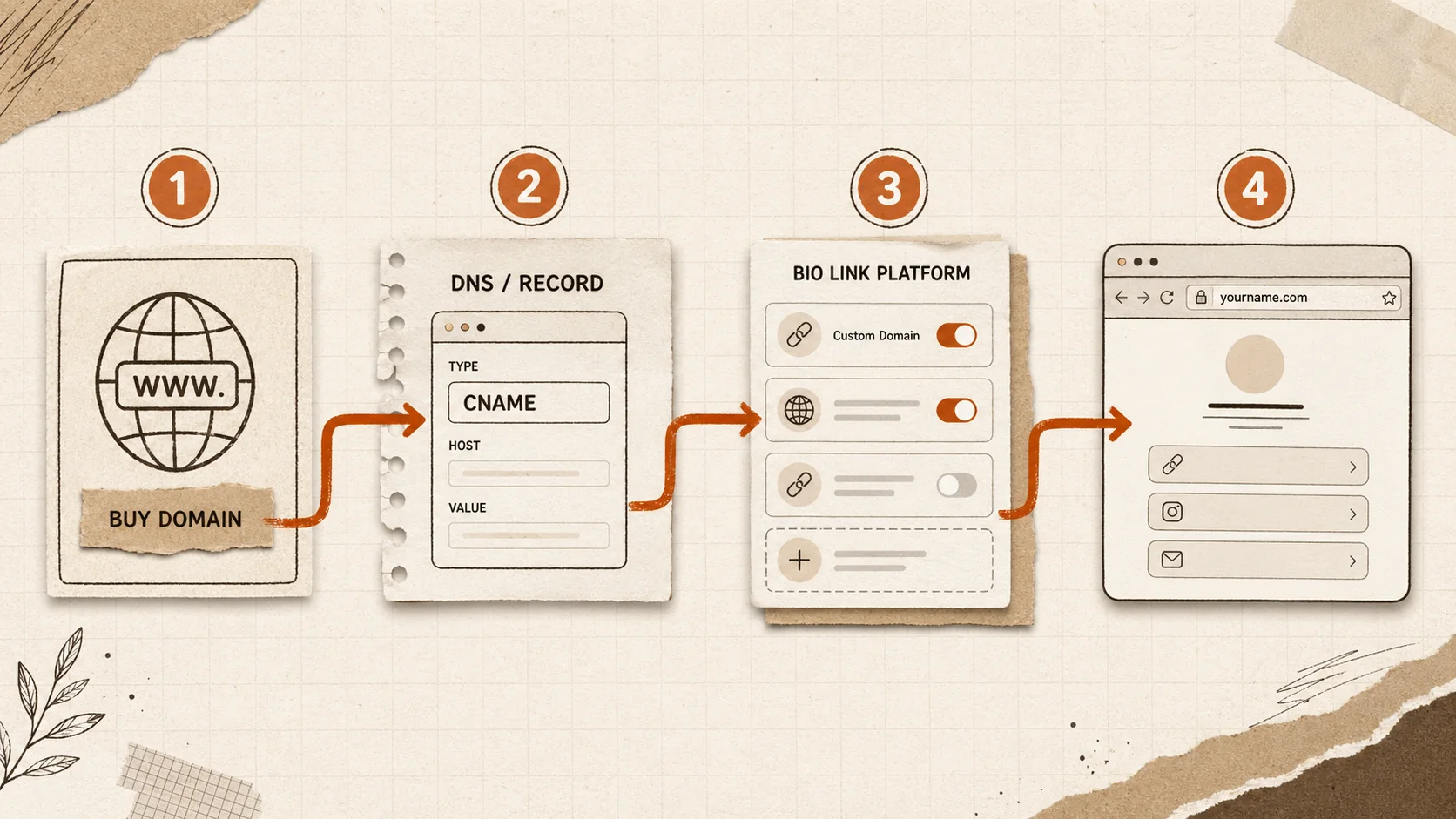
Step 1: Buy the Domain
If you do not already own one, buy yourname.com or a close variant. Recommended registrars in 2026:
- Cloudflare Registrar. At-cost pricing (no markup), included WHOIS privacy, the cleanest DNS panel in the industry. Around 10 USD per year for a
.com. - Porkbun. Slightly cheaper than Cloudflare on some TLDs, generous included add-ons (WHOIS privacy, basic email forwarding). Around 9 USD per year for a
.com. - Namecheap. The most established alternative. Around 10 to 12 USD per year for a
.com. Solid documentation.
Avoid GoDaddy. Higher renewal prices, aggressive upsells, dated DNS panel.
Step 2: Find the Records Your Bio Link Host Needs
Each platform exposes a "Custom Domain" or "Domains" section in settings. Copy the records they show you. Two formats to expect:
- CNAME record. Format:
name = your-subdomain (or @ for apex), target = cname.host.com. Used by Popout, Hopp, Link Gallery, Carrd (for subdomains). - A record. Format:
name = @, target = 76.76.21.21 (or whatever IP). Used by Beacons, Carrd (for apex), Shorby.
Some hosts also require a TXT record for verification. Always copy that exactly. A typo anywhere costs you a 24-hour propagation cycle.
Step 3: Add the Records at Your Registrar
In Cloudflare, open the domain, click DNS, click Records, click Add Record. Choose the type, paste the name and target, save. If Cloudflare is set to proxy mode (the orange cloud), turn it off for bio link hosts unless the host explicitly supports proxied traffic. Most do not.
In Namecheap or Porkbun, the panel is similar. Add Record, choose type, name, value, save.
Step 4: Verify and Wait
Click Verify in your bio link host's dashboard. The host pings DNS, sees the record, and starts SSL provisioning. This step takes 2 minutes to 24 hours depending on TTL settings. Most users see live in under an hour.
If verification fails, the most common causes are:
- Cloudflare proxy is on. Toggle the orange cloud to gray.
- Wrong record type. A record vs CNAME mix-up. Check the host's documentation.
- Apex CNAME on a registrar that does not support it. Some registrars (Namecheap historically) reject CNAMEs at the apex. Use ALIAS or ANAME records, or move DNS to Cloudflare which does support CNAME flattening.
- TTL too high. Lower TTL to 300 seconds during setup, raise to 3600 once stable.
Step 5: Update Everywhere
Once yourname.com is live, update everywhere your old URL appeared. Email signatures, social media bio fields, business cards (if you have a stock printed, slap a sticker on or order new ones), podcast intros, anywhere your audience touches you. Set up a 301 redirect from your old linktr.ee/yourname URL to your new domain if the host supports it. Most do not, which is part of why custom domains matter in the first place.
How to Migrate Without Losing Backlinks
This is the part most articles skip. If you are switching from a Tier 1 host (Linktree) or a Tier 2 host (Bio.fm, Snipfeed) to one of the six tools above, you have backlinks to protect.
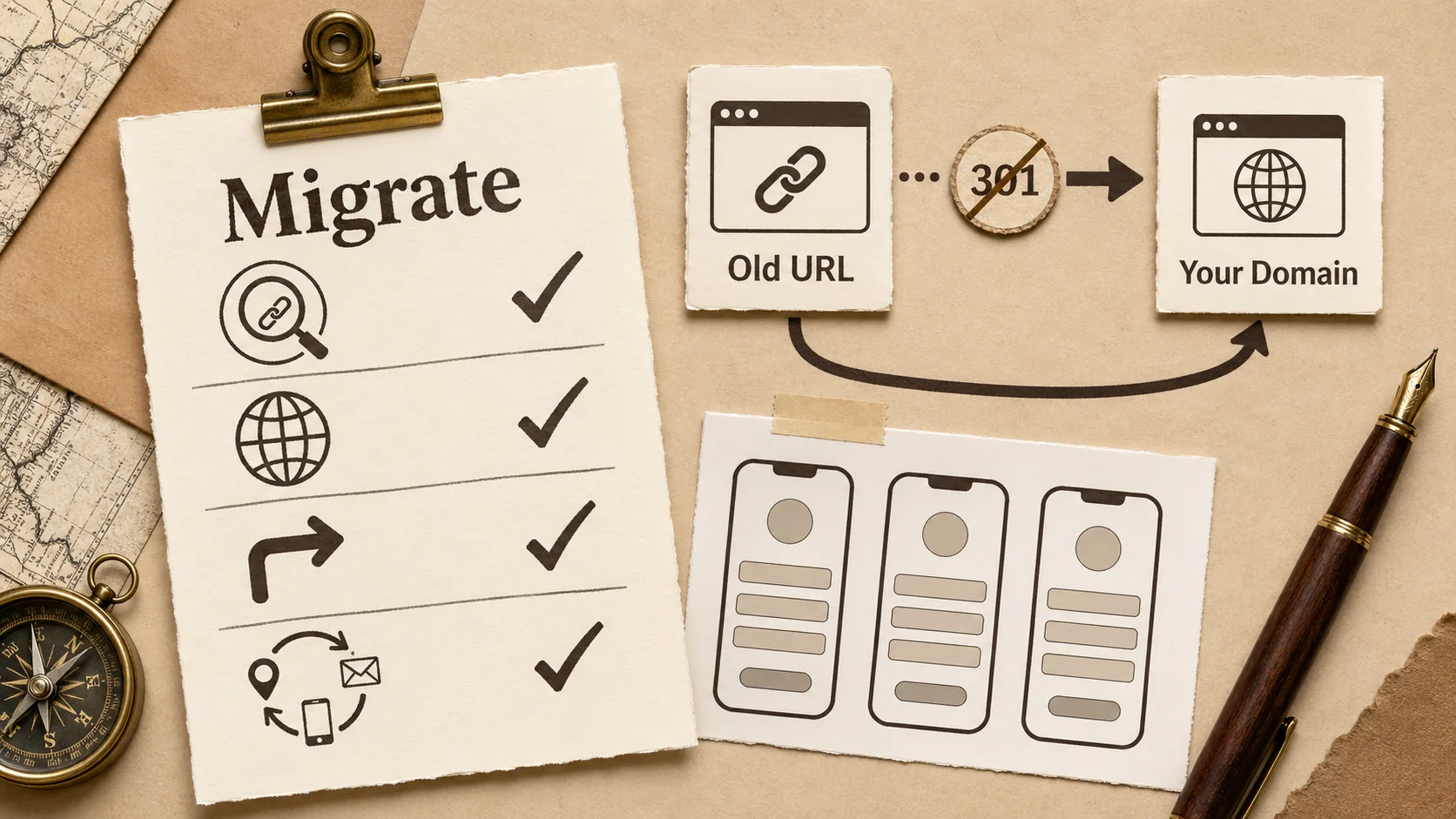
1. Audit your inbound links. Use Ahrefs included backlink checker, Ubersuggest, or Google Search Console (if you have ever verified your old URL) to list every domain pointing at your old bio link.
2. Set up the new domain first. Do not break the old URL until the new one is live, indexed, and tested. Open it in incognito, on mobile, on a friend's phone. Click every link.
3. Use a redirect service. Most Tier 1 hosts will not redirect your linktr.ee/yourname to your new domain. Workaround: register a single-purpose yourname-bio.com domain, set it up to 301-redirect to your new bio domain, and replace high-value backlinks one at a time with the new domain. Slow, but it works.
4. Notify your audience. A pinned tweet, an Instagram story, an email newsletter blast announcing the new URL. Expect 4 to 8 weeks for organic traffic to shift fully.
5. Decommission the old account. Once analytics show the new domain is carrying 80 percent or more of historical traffic, archive a screenshot of your old profile and close the account. Keep the screenshot for portfolio history.
For a more thorough migration framework, the Jotform 2026 Linktree alternatives roundup walks through the same process from the marketer angle.
Apex vs Subdomain: Which Should You Use
Strong opinions in the bio link community on this one. The defensible answer in 2026:
Use the apex (yourname.com) if the bio link is your primary online identity. It is the URL you put on business cards, in podcast intros, in email signatures. Keep it short, memorable, and identical to your name.
Use a subdomain (bio.yourname.com or links.yourname.com) if you already have a primary site at yourname.com (a portfolio, a company landing page, a blog) and the bio link is a secondary asset that lives next to it. This is common for established freelancers and small business owners.
Avoid me.yourname.com or hi.yourname.com style cute prefixes. Memorability suffers. Six months from now you will not remember if it was me. or hi. and neither will your audience.
Common Mistakes to Avoid
Five traps people fall into when setting up a custom domain on a bio link.
1. Buying the wrong TLD. yourname.bio and yourname.link exist. They are also harder to spell, harder to remember, and they cost 4 to 10 times more than a .com per year. Stick with .com unless your name is taken and you have a strong reason for the alternative.
2. Forgetting WHOIS privacy. Without WHOIS privacy, your home address and phone number are publicly searchable. Cloudflare and Porkbun include WHOIS privacy included. Namecheap and others sometimes upsell it. Always turn it on.
3. Using a included DNS provider that does not support apex CNAMEs. If your bio link host needs a CNAME at the apex and your DNS provider does not support CNAME flattening (also called ALIAS or ANAME records), the setup will fail. Cloudflare supports CNAME flattening natively. Most others do not. When in doubt, use Cloudflare for DNS.
4. Skipping the SSL check. Some hosts provision SSL within minutes. Others take hours. Always check that https://yourname.com loads with a valid certificate before sharing the URL anywhere. A self-signed or missing certificate looks worse than a Linktree subdomain ever did.
5. Not testing on mobile. 73 percent of bio link traffic is mobile, per the Link Gallery 2025 study. Test on iOS Safari, Android Chrome, and (if you have an audience there) the in-app browsers in Instagram and TikTok. In-app browsers occasionally render differently than full mobile browsers.
For more practical bio link tactics, our bio link first 3 seconds attention test and our bio link loading speed guide cover the conversion side once your domain is live.
A Note on Lock-In Beyond the Domain
A custom domain is the most important portability lever, but it is not the only one. Three other lock-in dimensions to watch:
Data export. Can you download your link list, your contact form submissions, your analytics history as a CSV? Popout, Beacons, and Carrd all expose CSV export. Linktree and Bio.fm do not, as of April 2026.
Theme portability. If your bio link page has a custom CSS theme, can you take it with you? None of the six platforms above let you export a theme as portable code. The trade-off here is that themes are usually re-buildable in 30 minutes. Not a deal-breaker.
Email list ownership. If your bio link captures email addresses (Beacons does this natively, Popout supports it through integrations), make sure the addresses sync to a service you control (ConvertKit, MailerLite, Mailchimp). Never let your email list live only inside the bio link platform.
The combination of a custom domain plus exportable data plus a portable email list is what makes a bio link a real career asset and not a hosted experiment.
Are Bio Link Custom Domains Better Than a Full Personal Website?
A fair question and the answer depends on your stage.
A custom-domain bio link is better than a full website when you need a single page that does the job today, you do not have time to maintain a multi-page site, and your goal is to route attention from social bios and email signatures to one focused destination. This is most freelancers, most job seekers, and most early-career professionals.
A full personal website is better when you publish content regularly (a blog, case studies, a newsletter archive), you sell services that require detailed pages, or you have a body of work that needs more than a single page to do justice. At that point, the bio link becomes the front door to a larger site, and it is fine to have both at yourname.com (full site) and links.yourname.com (bio).
For the all-in-one case, our Squarespace alternatives 2026 portfolio builders comparison covers the full-site options. For the focused bio link plus portfolio combo, Popout's included tier with a custom domain is the cleanest path in 2026.
FAQ
Does Linktree support real custom domains in 2026?
No. Linktree's "custom domain" feature is a branded short link (shor.by/yourname), not a true Tier 3 custom domain. The page itself still lives on Linktree's infrastructure. If you cancel your subscription, the link breaks. As of April 2026, Linktree does not let you point yourname.com at a Linktree profile.
What is the cheapest way to get a custom domain bio link in 2026?
Two paths tie for cheapest. Popout offers custom domains included on every tier (only cost is the domain itself, around 10 USD per year at Cloudflare). Carrd Pro Lite at 19 USD per year supports up to 3 custom domains. Both work out to under 30 USD per year all-in.
How long does DNS propagation take when setting up a custom bio link domain?
Typically 5 to 30 minutes if your TTL is set to 300 seconds. Up to 24 hours in worst-case propagation scenarios across global DNS resolvers. Most users see the domain live within an hour. Lower your TTL to 300 seconds 24 hours before the switch to minimize propagation time on the cutover.
Can I use a subdomain like bio.yourname.com instead of the apex?
Yes, all six platforms in this guide support subdomains. Subdomains are easier to set up because they always use CNAME records, which every DNS provider supports. Apex domains sometimes need ALIAS or ANAME records, which not all providers support natively. If you already have a primary site at yourname.com, a subdomain bio link is the cleaner architecture.
Will I lose my Linktree analytics if I migrate to a custom domain on a different platform?
Yes, historical analytics stay locked inside the old platform unless you export them to CSV first. Linktree allows CSV export of click data on paid tiers. Beacons, Popout, and Carrd will start fresh analytics on the new domain. Plan for a 60 to 90 day transition window where you compare like-for-like before drawing conclusions about whether the new platform performs better or worse.
Can I point one custom domain at multiple bio link tools?
No, a domain or subdomain points at exactly one host at a time. If you want one for a portfolio and one for a bio link, use a subdomain split: yourname.com at the portfolio host, links.yourname.com at the bio link host. Both share your brand, both are under your control.
Is SSL automatic on bio link custom domains?
Yes on all six platforms covered in this guide. Each host provisions a Let's Encrypt certificate automatically once DNS verification completes. SSL renewal is handled by the host. You will never need to install a certificate manually.
What happens to my custom domain if my bio link host shuts down?
This is the entire point of owning the domain. If your host shuts down, you change one DNS record at your registrar, point at a new host, and your audience continues hitting yourname.com without noticing. This is what saved users who had Bento on a custom domain when Bento went dark in February 2026, and what stranded users on bento.me/yourname URLs.
Should I buy multiple TLDs to protect my brand?
For most individuals, one .com is enough. For small businesses with active SEO, defensive registrations of .net and one country-code TLD (.co.uk, .de, etc.) for relevant markets are reasonable. Beyond that, the costs outweigh the benefits.
How do I handle email at my new custom domain?
Email is a separate concern from the bio link DNS records. If you want you@yourname.com, set up email forwarding through your registrar (Cloudflare and Porkbun include included forwarding) or pay for Google Workspace, Fastmail, or Proton Mail. The MX records for email are independent of the CNAME or A records pointing at your bio link host. Both can coexist on the same domain.
For a deeper look at the broader bio link landscape, including platforms not covered here, the Rebrandly 10 better tools post and our own linktree alternatives guide cover the full set. For tools and templates, browse our tools directory.
Other Doved Studio projects
Related tools from the same studio you might find useful:
- Ralphable: Generate structured Claude Code skills that iterate until pass/fail criteria are met.
- Glean: Turn scrolling time into a daily action plan. Capture, process, execute.
- Doved Studio: Studio indie derriere cette app et une dizaine d'autres outils.
Written by
Popout Team
Content Team