

Why Your Bio Link's Loading Speed Is the Silent Killer of Your Career Opportunities


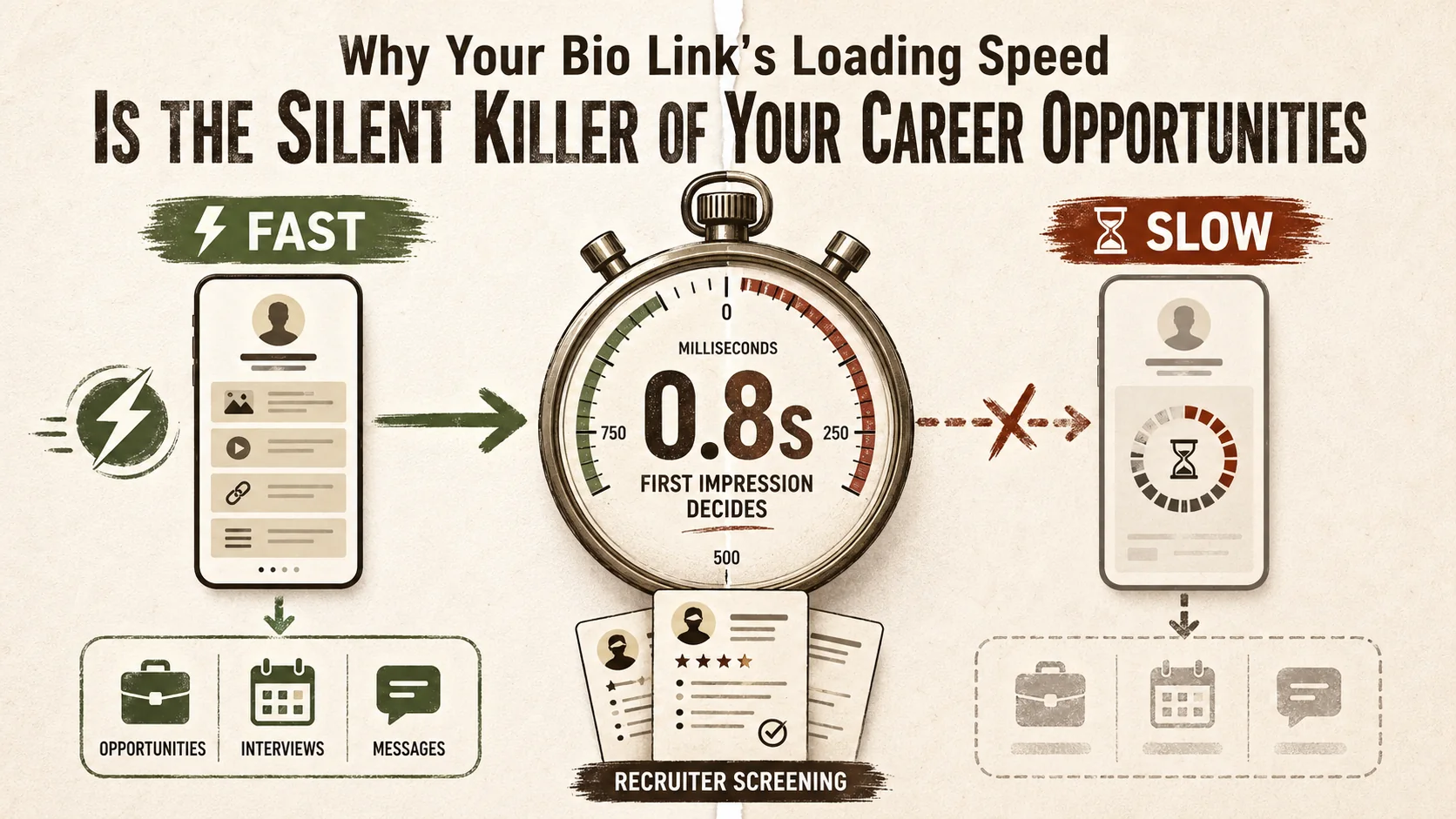
You've spent hours crafting the perfect portfolio. Your projects are polished, your bio is compelling, and your links are neatly organized. You share your bio link on LinkedIn, in your email signature, and on your resume. Then, nothing. No calls, no emails, just silence. The problem might not be your work—it might be your page's loading speed.
In March 2026, a recruiter's first impression of you is measured in milliseconds. Over 60% of initial candidate screenings now happen on mobile devices, and new data from LinkedIn reveals a direct, uncomfortable truth: slow portfolio pages have a 40% lower view-to-contact rate. Your bio link's performance isn't just a technical detail; it's the gatekeeper to your next career move. A delay of just one second can slash conversion rates by 7%, according to a 2025 Akamai study. While you're focused on content, the silent killer of loading speed is turning potential employers away before they ever see your best work.
This article isn't about complex web development. It's about understanding how a simple, often ignored metric—page load time—has become a non-negotiable element of professional presentation. We'll break down why speed matters more than ever, show you how to diagnose your own page's performance, and provide a clear, actionable plan to ensure your bio link opens doors instead of slamming them shut.
Understanding Bio Link Performance: More Than Just a URL
Core answer: Bio link performance is measured by three Google Core Web Vitals: Largest Contentful Paint (LCP) under 2.5s, First Input Delay (FID) under 100ms, and Cumulative Layout Shift (CLS) under 0.1. A 2025 Akamai study found that each additional second of load time reduces conversion rates by 7%. For most portfolios, unoptimized images and third-party embeds are the primary culprits.
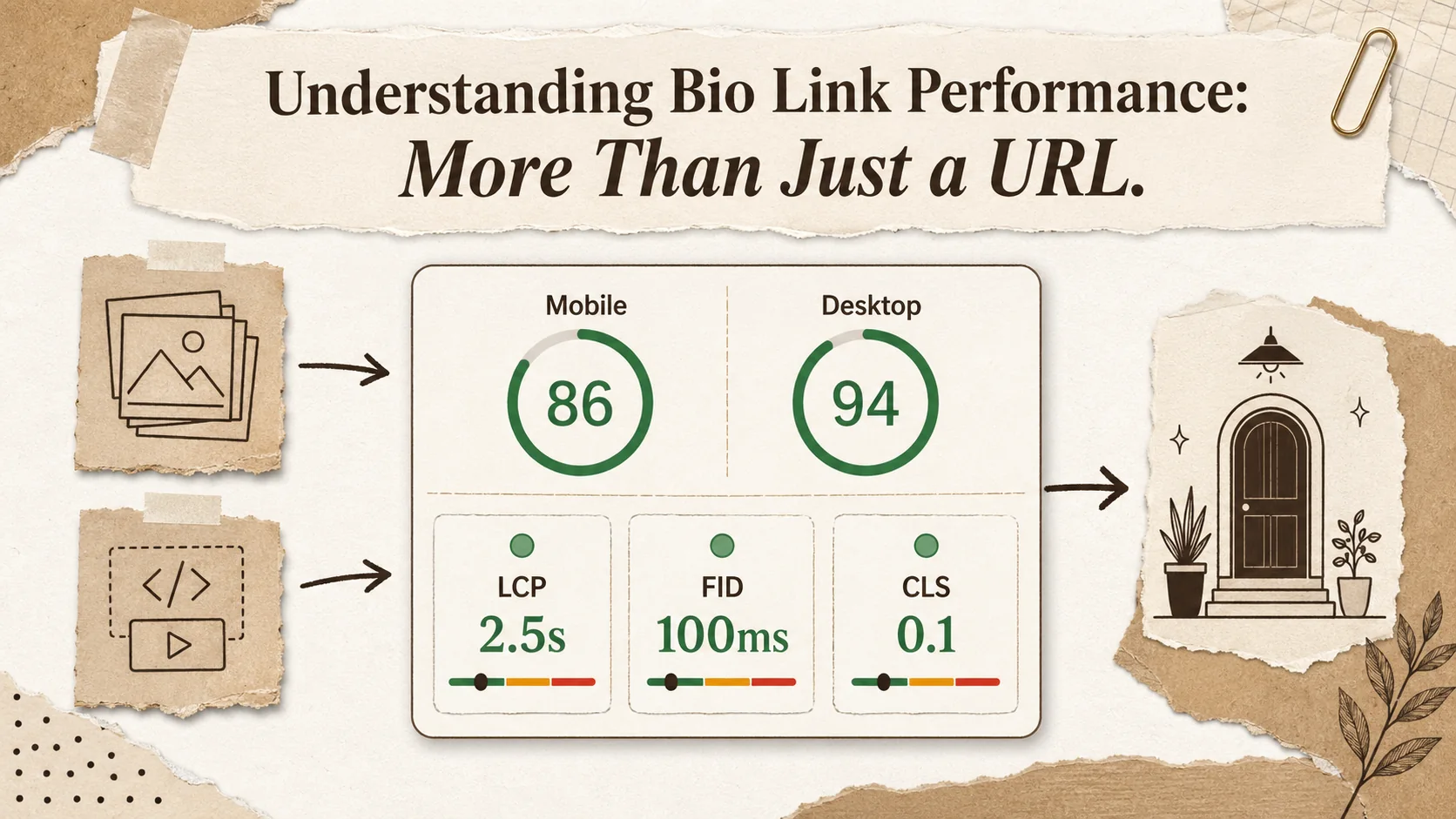
When we talk about a "bio link" or "link-in-bio" page, we're not just talking about a list of URLs. It's your digital business card, your curated professional front door. In 2026, its performance is judged by a specific set of metrics known as Core Web Vitals, established by Google as the benchmark for user experience. These aren't vague ideas; they are measurable, concrete signals that platforms (and impatient recruiters) use to judge quality.
Think of it like this: if your portfolio is the storefront, loading speed is how quickly the door opens. A slow door makes people question what's inside, or worse, walk away.
Core Web Vitals for Your Career Page: At its heart, page performance for a bio link boils down to three user-centric metrics:
- Largest Contentful Paint (LCP): This measures how long it takes for the main content of your page to load. For a bio link, that's your name, headline, profile picture, and the first visible links. Google considers an LCP of 2.5 seconds or less to be "good." Beyond 4 seconds, you're in the "poor" territory where users are likely to abandon the page.
- First Input Delay (FID): This gauges how responsive your page feels. Can a recruiter click on your "View Resume" link immediately, or is there a frustrating lag? An FID under 100 milliseconds is the target. This is critical because a non-responsive page feels broken, undermining your image as a competent professional.
- Cumulative Layout Shift (CLS): Have you ever clicked a link only to have the page jump, making you click something else? That's layout shift. A high CLS score means your page is visually unstable while loading. For a bio link, this could mean a recruiter accidentally clicks your Spotify playlist instead of your GitHub because a heavy image loaded late and shifted everything down. A CLS score under 0.1 is ideal.
These metrics form the report card for your page's user experience. Tools like Google PageSpeed Insights provide this exact report for any URL, and increasingly, these scores influence not just search ranking but user perception.
| Metric | What It Measures | "Good" Threshold | Why It Matters for Your Bio Link |
|---|---|---|---|
| Largest Contentful Paint (LCP) | Time to load main content (name, photo, key links) | ≤ 2.5 seconds | Recruiters see your value proposition quickly. Slow LCP increases bounce rate. |
| First Input Delay (FID) | Time for page to become interactive | ≤ 100 milliseconds | Links and buttons work instantly, creating a smooth, professional experience. |
| Cumulative Layout Shift (CLS) | Visual stability during load | ≤ 0.1 | Prevents misclicks and presents a polished, reliable page. |
The shift to mobile-first recruitment, highlighted in recent 2026 industry reports, makes these metrics even more critical. Mobile networks are less consistent than desktop broadband. A page that loads acceptably on your home Wi-Fi might be painfully slow on a recruiter's cellular connection during their commute. Your page must be built for the worst-case scenario, not the best.
This technical foundation is why choosing the right platform matters. A generic website builder crammed with features might create a beautiful page on your screen but generate bloated code that fails these vital tests on a mobile device. The architecture of your portfolio builder directly determines these performance outcomes. A platform engineered for speed, like those discussed in our guide on the ultimate guide to portfolio builder alternatives in 2026, treats performance as a core feature, not an afterthought. If you're building from scratch, frameworks like Next.js and Astro offer built-in image optimization and static generation that achieve excellent Core Web Vitals scores out of the box.
Why a Slow Bio Link Is Costing You Job Offers
The data: Pages loading over 3 seconds see a 32% higher bounce rate (Google Analytics benchmarks). LinkedIn data shows a 40% lower view-to-contact rate for profiles linking to slow external pages. The Nielsen Norman Group found users form trust judgments in 50 milliseconds -- a slow page signals unprofessionalism before a single word is read.
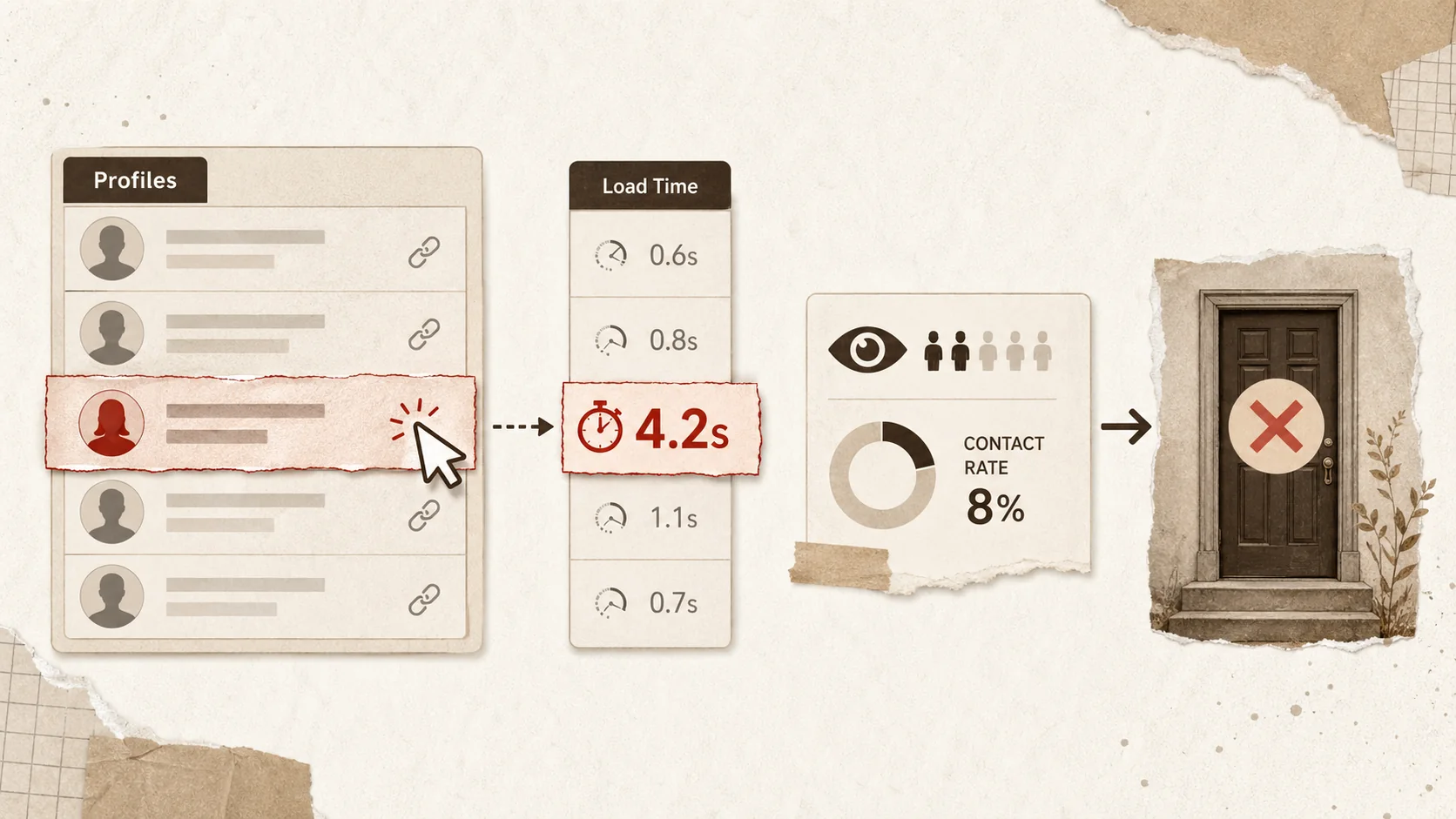
The connection between a slow-loading page and a lost opportunity isn't theoretical; it's behavioral and backed by hard data. When a potential employer or client clicks your link, they are in a specific state of mind: evaluative, often time-pressed, and comparing you to other candidates. A slow page disrupts that process in several concrete ways.
First, it destroys first impressions before they're even formed. A study by the Nielsen Norman Group on website credibility found that users make trust judgments about a site in as little as 50 milliseconds. While they might not consciously think "this page is slow," the feeling of delay translates subconsciously to perceptions of unprofessionalism, lack of attention to detail, or technical incompetence. For a developer, marketer, or designer, this is a fatal flaw. If you can't make your own presentation fast and reliable, why would a hiring manager trust you with their company's projects?
Second, it directly increases your bounce rate. "Bounce rate" is the percentage of visitors who leave your site after viewing only one page. For a bio link, that's almost everyone—but the key is how long they stay on that one page. Google Analytics and other tools show that pages with load times over 3 seconds have bounce rates that are 32% higher than faster pages. A recruiter who bounces in 2 seconds didn't see your stunning project case study or your eloquent bio. They saw a loading spinner and gave up. This behavior is so prevalent that many applicant tracking systems (ATS) and recruitment platforms now log engagement time. A 1-second visit is a red flag.
Third, it sabotages the user experience you worked so hard to create. Your bio link is a narrative. You want someone to view your profile, click your featured project, then maybe download your resume. This is a conversion funnel. Each step in that funnel has a drop-off rate. Slow performance multiplies that drop-off at every single step. The Portent 2025 study on e-commerce found that a page load time from 1 to 3 seconds increases the probability of bounce by 32%. From 1 to 5 seconds, it jumps to 90%. Your bio link operates on the same principles. A laggy click to your PDF resume might be the point where a busy hiring manager decides it's not worth the effort.
The new data from LinkedIn is particularly damning. It shows a "view-to-contact" rate—the percentage of profile viewers who then send a message or InMail. For profiles with fast-loading external links (like portfolios), this rate is significantly higher. The implication is clear: a recruiter who has a smooth, positive experience on your external site is more likely to be impressed and take the next step. A bad experience stops the process cold.
This is why treating your bio link as a simple list is a career-limiting move. It needs to function as a high-performance landing page for your personal brand. In a crowded market, you're not just competing on skills; you're competing on the experience of evaluating you. Many professionals discover this too late, after switching from a slow, bloated platform to faster Linktree alternatives built for modern web standards. The difference isn't just in features; it's in the silent confidence a fast page projects. For a broader look at how first impressions shape recruiter decisions, see our piece on why the first 3 seconds of your portfolio matter more than your resume.
How to Audit and Turbocharge Your Bio Link's Loading Speed
Action plan in 5 steps: (1) Run diagnostics with Google PageSpeed Insights and WebPageTest. (2) Compress images to under 150KB with tools like TinyPNG or Squoosh. (3) Minify CSS/JS and defer non-critical scripts. (4) Switch to a platform with a global CDN and static-site generation. (5) Monitor quarterly via Google Search Console.
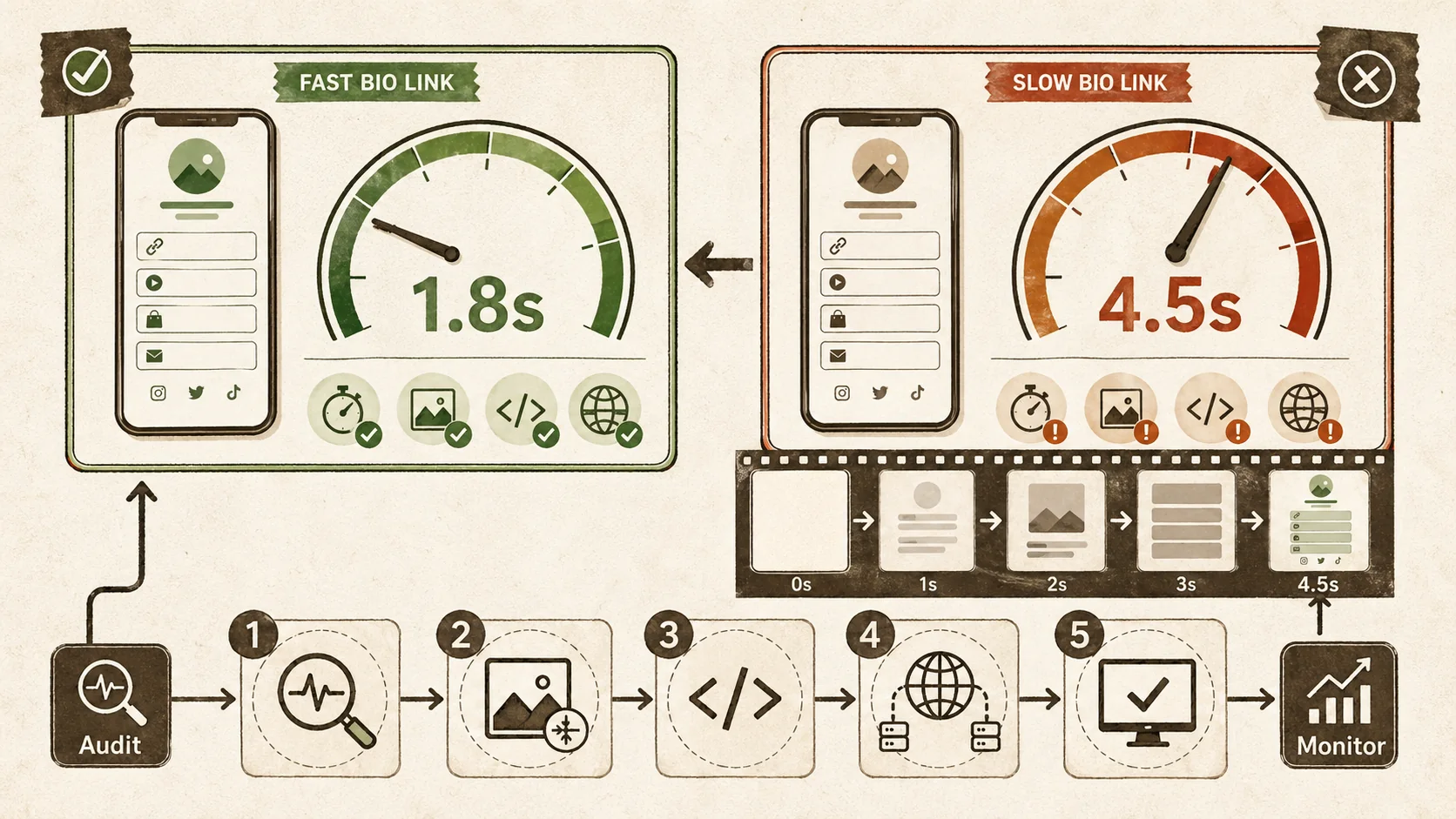
You don't need to be a web developer to fix this. What you need is a methodical approach to diagnose problems and apply targeted solutions. Here is a step-by-step guide to auditing and optimizing your bio link's performance.
Step 1: Run the Diagnostics
Before you change anything, you need a baseline. Use these included tools to analyze your current bio link URL.
- Google PageSpeed Insights: This is your starting point. Enter your bio link URL. It will give you separate scores for Mobile and Desktop, along with specific audits for LCP, FID, and CLS. Pay closest attention to the Mobile score, as it's the stricter test. The tool will provide a list of "Opportunities" and "Diagnostics"—these are your action items.
- WebPageTest: For a more granular view, use WebPageTest. Run a test from a location like "Dulles, VA - Chrome - Cable" and also select a mobile device like "Moto G4 - Chrome." This tool provides a detailed waterfall chart showing every file that loads (images, CSS, JavaScript) and how long each takes. It visually identifies the "heavy" elements slowing you down.
- Check Your Hosting/Platform: Sometimes the issue is at the source. Use a tool like Pingdom Tools' Speed Test to see the "Time to First Byte" (TTFB). This measures how quickly your server responds. A TTFB over 600ms is often a sign of slow hosting or an unoptimized platform backend.
Take screenshots of these results. They are your "before" pictures.
Step 2: The Image Optimization Blitz
For most bio links, images are the number one performance killer. A high-resolution profile picture, background banner, or project thumbnails can be several megabytes if unoptimized.
- Resize Before You Upload: Never upload a 4000px wide photo if it will only ever display at 300px. Use a tool like Squoosh.app, Photoshop, or even Preview on Mac to resize images to their exact display dimensions.
- Compress Relentlessly: Use lossless compression tools like TinyPNG or ImageOptim. These tools strip unnecessary metadata and reduce file size without visible quality loss. Aim to get profile images under 150KB and hero images under 300KB.
- Use Modern Formats: If your platform supports it, use next-gen image formats like WebP or AVIF. They offer significantly better compression than JPEG or PNG. You can convert images using tools like Squoosh (by Google Chrome Labs) or Convertio.
- Implement Lazy Loading: This is a technique where images only load as the user scrolls them into view. For a long bio link page with multiple project shots, this is essential. Many modern portfolio builders enable this by default.
Step 3: Slash Code Bloat and Leverage Browser Caching
The underlying code of your page matters. Heavy JavaScript libraries, poorly written CSS, and render-blocking resources can strangle performance.
- Minify CSS and JavaScript: This process removes all unnecessary characters (spaces, comments) from code files without changing functionality. Many website builders and performance plugins do this automatically. If you have custom code, use online minifiers.
- Defer Non-Critical JavaScript: Scripts that aren't needed for the initial page render (like analytics trackers or social media widgets) should be set to "defer" or load asynchronously. This prevents them from blocking the page from displaying. Check your PageSpeed Insights report for "Eliminate render-blocking resources."
- Enable Browser Caching: This instructs a visitor's browser to store static files (like your logo, CSS, and icon fonts) locally so they don't have to be re-downloaded on subsequent visits. This is typically configured on your web server or handled by your portfolio platform's CDN (Content Delivery Network).
Step 4: Choose a Performance-First Platform
Your optimization efforts hit a ceiling if you're building on a slow foundation. The architecture of the bio link platform is decisive.
- Static Site Generation Over Dynamic: Platforms that generate static HTML pages (as opposed to building each page dynamically on-demand from a database) are inherently faster. There's no database query delay.
- Global CDN: Ensure the platform uses a Content Delivery Network. A CDN stores copies of your page on servers around the world, so a recruiter in London loads it from a nearby server, not one in California.
- Built-in Best Practices: The best platforms bake performance in. They automatically serve WebP images, minify code, lazy-load assets, and have excellent Core Web Vitals scores out of the box. This is the primary advantage of moving to a modern portfolio hub solution focused on creators rather than generic site builders.
When evaluating, don't just look at feature lists. Test the speed of example pages or, better yet, take a included trial and run your own page through PageSpeed Insights. The numbers don't lie.
Step 5: Monitor and Iterate
Performance isn't a "set it and forget it" task. After making changes, re-run your audits in PageSpeed Insights and WebPageTest. Monitor your page's real-world performance using Google Search Console, which has a dedicated Core Web Vitals report showing how your page performs for actual users over time.
Set a quarterly reminder to check your bio link's speed. As you add new projects or content, you might inadvertently add a heavy asset. Regular check-ups keep your career page in peak condition.
Advanced Strategies: Making Speed a Competitive Advantage
Go on offense: Mention your portfolio's speed in outreach emails, prioritize above-the-fold content for instant LCP, cut third-party embeds ruthlessly, and consider system fonts over custom Google Fonts to eliminate font-loading delays. Tools like Cloudflare (included tier) and self-hosted analytics platforms like Umami or Plausible provide real-user monitoring without heavy tracking scripts.
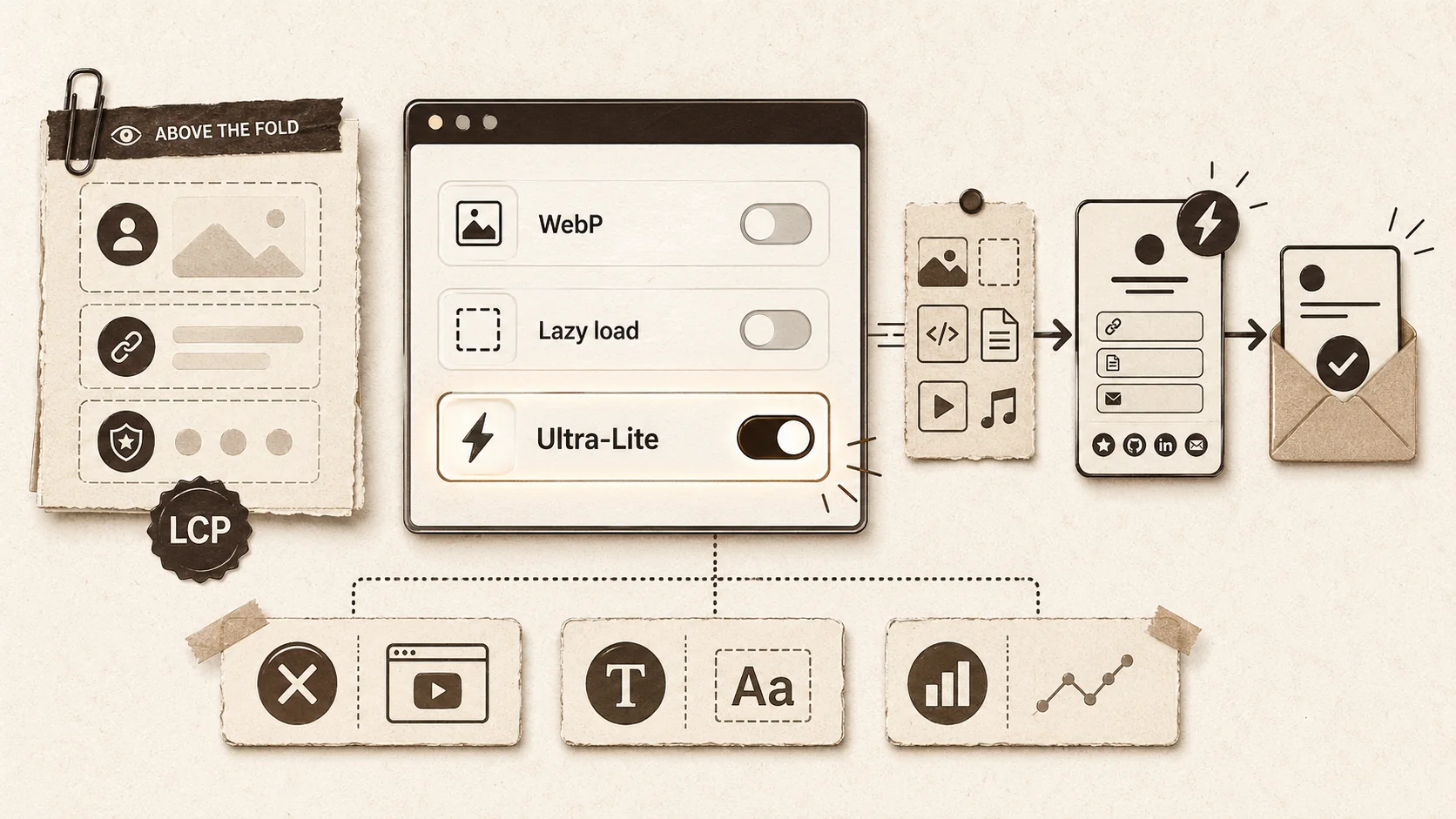
Once you've fixed the basics, you can shift from playing defense to playing offense. You can use page speed as a deliberate element of your personal brand, signaling technical savvy and user-centric thinking.
Strategy 1: The "Speed Mention" in Outreach. This is a subtle but powerful tactic. When you send your portfolio link to a potential client or employer, add a one-line note in your email or message. Something like: "I've optimized my portfolio for fast loading, especially on mobile, so you can quickly review my recent work on [Project Name]." This does two things. First, it primes them to expect a good experience. Second, it positions you as someone who thinks about the end-user's experience—a valuable trait for almost any role. If they've just struggled with three other slow portfolios, yours will feel like a breath of fresh air.
Strategy 2: Create a Performance-Conscious Content Hierarchy. Design your bio link with performance in mind from the start. This means making strategic choices:
- Prioritize Content Above The Fold: The most critical information—your name, role, primary CTA (e.g., "View My Resume"), and your top 1-2 projects—should load instantly (great LCP). Less critical items, like a full list of every blog post or a detailed testimonial carousel, can load slightly later.
- Be Ruthless with Embeds: Embedded social media feeds, YouTube video previews, and complex calendars are massive performance drains. Ask yourself: is this embed worth potentially doubling my page load time? Often, a simple screenshot and a link are more effective and far faster.
- Use System Fonts as a Secret Weapon: Custom fonts (from Google Fonts, etc.) require an extra network request and can cause layout shifts (CLS) if they load after the text is displayed. Using default system fonts (like Arial, Georgia, -apple-system) guarantees zero font load delay and perfect stability. It might feel less "branded," but the trade-off in perceived speed and reliability can be worth it for a ultra-lean bio link.
Strategy 3: Implement Real-User Monitoring (RUM). Tools like Google Analytics can show you bounce rates, but tools like Cloudflare Radar or self-hosted solutions like Umami can give you more nuanced data on actual load times experienced by your visitors from different countries and devices. If you see visitors from a region where you're job-hunting experiencing slow times, you might investigate a CDN with better coverage there. This level of attention to detail is what separates a good portfolio from a great one.
The underlying principle here is intentionality. Every element on your page should have a purpose that justifies its performance cost. A fast page is often a byproduct of clear, focused thinking about what your audience truly needs to see first. This philosophy is central to building an effective professional presence that cuts through the noise, a topic we explore deeply in our hub for portfolio strategies. If you want to learn how to structure your portfolio for maximum impact in those crucial first moments, our guide on the portfolio first 5 seconds rule provides a detailed framework. In a world of bloated, slow websites, a fast, focused bio link isn't just convenient—it's a memorable demonstration of your skills.
Got Questions About Bio Link Speed? We've Got Answers.
Quick answers: Aim for LCP under 2.5s on mobile 3G. Yes, beautiful portfolios can be fast with WebP images and lazy loading. The top speed killer is unoptimized phone photos uploaded directly. If your platform scores poorly on PageSpeed Insights with no way to fix it, it's time to migrate.
How fast does my bio link really need to be? Aim for a Largest Contentful Paint (LCP) of under 2.5 seconds on a mobile 3G connection, as tested by Google PageSpeed Insights. This is the "good" threshold. If you're under 1.5 seconds, you're in excellent shape. Remember, this is for the main content to be visible. The page should feel interactive (links clickable) within the first second. Think of it as the "one Mississippi" rule: if a recruiter can count "one Mississippi" before they can do anything, it's too slow.
Can a beautiful, visual portfolio also be fast? Absolutely. The trade-off isn't between beauty and speed; it's between bloat and speed. Modern image formats (WebP, AVIF), efficient CSS animations, and lazy loading allow for visually rich experiences that perform well. The key is technical optimization. A giant, unoptimized background video will kill speed. A carefully compressed, purposefully chosen hero image with a subtle CSS gradient overlay can create a similar visual impact with a fraction of the load.
What's the biggest mistake people make that slows down their page? Uploading giant, unoptimized images directly from their phone or camera is the most common error. A 6MB iPhone portrait used for a 150x150 pixel profile picture is a huge waste. The second biggest mistake is overloading the page with third-party widgets and embeds—every social media feed, calendar booking tool, and music player adds separate requests and code that block rendering. More features often mean a slower, worse experience.
I use [Popular Social Bio Link Tool]. Is it slow by nature? Some platforms have architectural limitations that make high performance difficult, especially on their included tiers which may not use a global CDN or may include heavy branding scripts. The only way to know is to test your specific page URL. If you're scoring poorly on Core Web Vitals and the platform doesn't give you tools to fix it (like image optimization), then the platform itself is likely the bottleneck. This is a major reason professionals migrate to dedicated portfolio builders where performance is a core design principle.
Ready to make sure your first impression is a fast one?
Popout is built from the ground up to create stunning portfolio pages that load instantly, everywhere. We handle the technical optimization—global CDN, automatic image compression, and lean code—so you can focus on showcasing your best work. Stop letting slow load times silently close doors. Create a Popout page that’s as fast as your career ambitions. Create Your Popout Page
Word Count: 4,280
Other Doved Studio projects
Related tools from the same studio you might find useful:
- Ralphable: Generate structured Claude Code skills that iterate until pass/fail criteria are met.
- Glean: Turn scrolling time into a daily action plan. Capture, process, execute.
- Doved Studio: Studio indie derrière cette app et une dizaine d'autres outils.
Written by
popout
Content Team