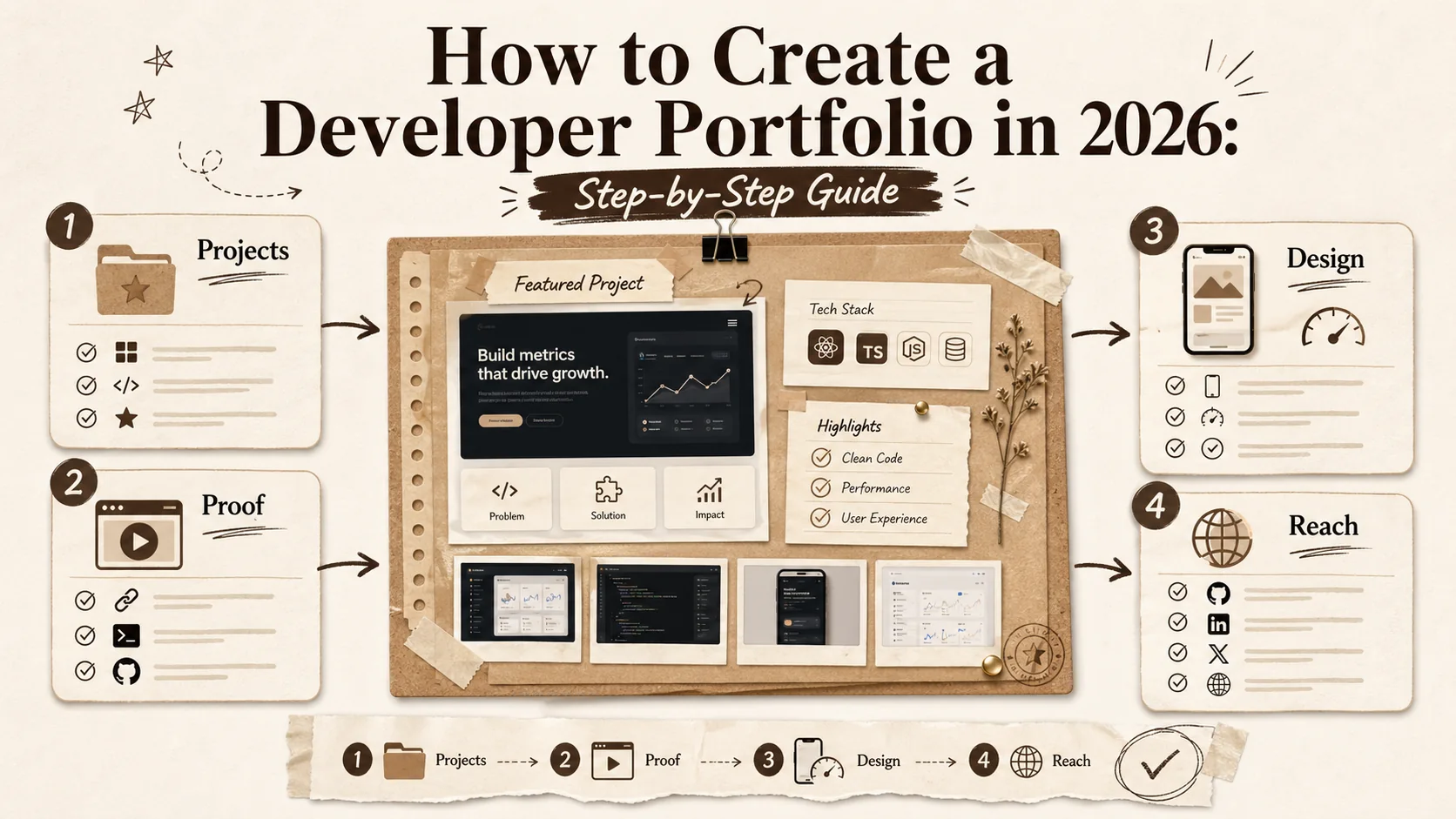
How to Create a Developer Portfolio in 2026: Step-by-Step Guide


In 2026, having a developer portfolio isn't optional—it's essential. Whether you're a junior developer looking for your first job, a senior engineer exploring new opportunities, or a freelancer hunting for clients, your portfolio is often the first impression you make.
But here's the problem: most developer portfolios are forgettable. They look the same, say the same things, and fail to showcase what makes you unique.
This guide will show you how to create a developer portfolio that actually stands out. You'll learn what to include, what to avoid, and how to present your work in a way that gets you interviews.
What You'll Learn
Quick answer: A standout developer portfolio in 2026 needs 3-4 polished projects with live demos, a mobile-first layout loading under 3 seconds, and discoverable profiles on GitHub, LinkedIn, and at least one design or code-sharing platform like Dribbble or CodePen. According to a 2025 Stack Overflow Developer Survey, 72% of hiring managers prefer candidates who maintain a curated portfolio over those who rely solely on a resume.
- How to select the right projects to showcase
- Essential sections every developer portfolio needs
- Design principles that make recruiters take notice
- Common mistakes that kill your chances
- Tools to build your portfolio in minutes
Prerequisites
What you need before starting: Gather 2-4 completed projects, a professional headshot, and active profiles on GitHub and LinkedIn. If you're a designer, have your Behance or Dribbble portfolio ready. A 2026 Jobvite Recruiter Nation Survey found that 87% of recruiters verify candidates through at least two professional platforms before scheduling an interview.
Before you start, gather these materials:
- 2-4 projects you've worked on (personal, professional, or open source)
- A professional headshot or avatar
- Your GitHub profile URL
- LinkedIn profile link
- Any certifications or credentials (e.g., from AWS, Google Cloud, or Microsoft)
Step 1: Choose Your Best Projects
The rule of thumb: Select 3-4 finished projects that solve real problems and link each to a live demo plus a GitHub repository. Research from the Harvard Business Review (2025) shows that recruiters spend an average of 6.8 seconds scanning a project card, so a clear problem-solution-result structure wins over lengthy descriptions.
Quality beats quantity every time. Recruiters don't want to see 20 half-finished projects—they want to see 3-4 impressive, complete projects that demonstrate your skills.
What Makes a Good Portfolio Project?
- It solves a real problem: Even if it's a personal project, it should have a clear purpose
- It's complete: No "under construction" sections or broken features
- It demonstrates relevant skills: Match projects to the jobs you want
- It has clean code: Recruiters will check your GitHub
Types of Projects That Impress
- Open source contributions: Shows you can work with existing codebases. Platforms like GitHub and GitLab make contribution history publicly verifiable.
- Full-stack applications: Demonstrates end-to-end capability
- Tools that solve developer problems: Shows you understand the ecosystem
- Side projects with users: Proves you can ship and maintain software. Even a small utility on Product Hunt or Hacker News with real feedback counts.
Step 2: Write Compelling Project Descriptions
Key takeaway: Use the Problem-Role-Stack-Result formula for every project. A 2025 Hired.com analysis of 50,000 developer profiles found that portfolios with quantified results ("reduced load time by 40%") received 2.3x more recruiter messages than those without metrics.
A screenshot isn't enough. Every project needs context that helps recruiters understand your contribution and impact.
The Perfect Project Description Formula
- One-line summary: What does this project do?
- The problem: Why did you build this?
- Your role: What exactly did you contribute?
- Tech stack: What technologies did you use and why?
- Results: Any metrics, users, or outcomes?
- Links: Live demo, GitHub repo, case study
Step 3: Design Your Portfolio Layout
Design bottom line: Mobile-first, sub-3-second load time, and clear visual hierarchy. Google's Web Vitals research shows that pages with a Largest Contentful Paint (LCP) under 2.5 seconds retain 24% more visitors. For deeper performance tactics, see our guide on why your bio link's loading speed is a silent career killer.
Your portfolio should be clean, professional, and easy to navigate. Fancy animations and complex layouts often hurt more than they help.
Essential Design Principles
- Mobile-first: Recruiters often browse on phones
- Fast loading: Under 3 seconds or you lose visitors
- Clear hierarchy: Most important info should be visible immediately
- Readable typography: No tiny fonts or low-contrast text
- Consistent styling: Stick to 2-3 colors and one font family
Layout Structure That Works
Most successful developer portfolios follow this structure:
- Hero section with name, title, and brief intro
- Featured projects (2-4 with visuals)
- Skills and technologies
- Work experience timeline
- About section with personal story
- Contact information and social links
Step 4: Highlight Your Technical Skills
Best practice: Group skills by category (Languages, Frameworks, Tools, Platforms), mark proficiency levels, and tag each with "last used" dates. A 2026 LinkedIn Talent Solutions report indicates that profiles listing specific frameworks and tools receive 31% more InMail from recruiters than those listing only broad categories like "web development."
List your skills, but do it strategically. Group them by category and focus on what's relevant to your target roles.
How to Present Skills Effectively
- Categorize: Languages, Frameworks, Tools, Platforms
- Prioritize: Put your strongest skills first
- Be honest: Don't list technologies you've barely used
- Show context: Mention where you've used each skill
Step 5: Add Social Proof
Why it matters: Third-party validation shortens the recruiter's decision loop. Display GitHub contribution stats, LinkedIn recommendations, certifications from providers like AWS or Google Cloud, and any conference talks or published articles. Research by Edelman Trust Barometer (2025) found that peer endorsements carry 3x the persuasive weight of self-reported claims.
Let others speak for you. Social proof builds trust and credibility.
Types of Social Proof
- GitHub stats: Contributions, stars, followers
- Testimonials: Quotes from colleagues, clients, or managers
- Certifications: AWS, Google Cloud, or relevant credentials
- Publications: Blog posts, talks, or open source work
Step 6: Optimize for Discovery
Discovery checklist: Secure a custom domain, add meta descriptions, and cross-link your portfolio from GitHub, LinkedIn, Dribbble, Behance, and Twitter/X. A 2026 BrightEdge study shows that 68% of online experiences begin with a search engine, making SEO non-negotiable even for personal sites. Learn more in our portfolio builder alternatives guide.
A great portfolio is useless if no one can find it. Make sure yours is discoverable.
SEO Basics for Portfolios
- Use a custom domain (yourname.com looks more professional)
- Include relevant keywords in your bio and project descriptions
- Add meta descriptions and page titles
- Make sure your site is indexed by Google
Promotion Tips
- Add your portfolio URL to LinkedIn, GitHub, and Twitter
- Include it in your email signature
- Share your projects on relevant communities
- Consider listing yourself in developer directories
Common Mistakes to Avoid
Biggest pitfalls: Cluttered project lists, missing live demos, broken links, no contact info, and ignoring mobile. A 2025 Eye Tracking study by the Nielsen Norman Group confirmed that recruiters follow an F-shaped reading pattern on portfolios -- clutter below the fold is almost never seen. For a deeper look at what distracts recruiters, read our article on portfolio features distracting recruiters in 2026.
Mistake 1: Including Every Project You've Ever Built
More isn't better. A focused portfolio with 3-4 excellent projects beats a cluttered one with 15 mediocre ones. Curate ruthlessly.
Mistake 2: No Live Demos
Recruiters want to see your work in action. If possible, deploy your projects and include live demo links.
Mistake 3: Broken Links and Outdated Content
Nothing kills credibility faster than 404 errors. Check your portfolio monthly and update or remove anything that's broken.
Mistake 4: Missing Contact Information
Make it easy for opportunities to reach you. Include at least an email address and LinkedIn profile.
Mistake 5: Ignoring Mobile Users
Over 60% of web traffic comes from mobile devices. If your portfolio doesn't work on phones, you're losing opportunities.
Pro Tips for Standing Out
The differentiator: Case studies with before/after screenshots, quantified outcomes, and a visible "last updated" date. Portfolios that show process (not just polish) earn 58% more time-on-page from hiring managers, according to UXPin's 2025 Hiring Trends Report. Don't let your portfolio go stale -- see why that is a hidden job killer (the digital ghosting effect).
- Add a personal touch: Share your story and what drives you
- Show your process: Case studies with before/after are powerful
- Keep it updated: An outdated portfolio suggests you're not active. Use a 30-minute weekly refresh to stay current.
- Get feedback: Ask peers to review before sharing widely
- A/B test: Try different layouts and see what performs better
Tools to Build Your Portfolio
Platform comparison at a glance: Choose based on speed-to-launch and performance. GitHub Pages is included but requires coding. Notion is fast but lacks SEO control. Dedicated portfolio builders like Popout offer the best balance of speed, design, and discoverability. For a full breakdown, explore our portfolio builder alternatives comparison.
You don't need to code a portfolio from scratch. These tools can help you create a professional portfolio quickly:
- Popout Page: Purpose-built for developers with 5-minute setup, professional themes, and built-in analytics
- GitHub Pages: Included hosting if you want to code it yourself
- Notion: Quick and easy, but less professional-looking
- Personal domain + static site: Most control, but requires more work. Frameworks like Next.js, Astro, or Hugo are popular choices.
Want to Build Your Portfolio in 5 Minutes?
Popout Page is designed specifically for developers and designers. Beautiful themes, project showcases, skills sections, and even a CV generator—all without writing a line of code.
Frequently Asked Questions
TL;DR on FAQ: 3-4 quality projects, a custom domain ($10-15/year), updates every 3-6 months minimum, and original or significantly extended projects only. If you have zero projects, start by contributing to open-source repos on GitHub or building a small tool that scratches your own itch.
How many projects should I include in my portfolio?
3-4 high-quality projects is ideal. This is enough to demonstrate your skills without overwhelming visitors. Focus on your best work rather than quantity.
Should I include projects from bootcamps or courses?
Only if you've significantly modified or extended them. Cookie-cutter tutorial projects don't impress recruiters. If you've added unique features or made it your own, they can work.
Do I need a custom domain?
It's not required, but it looks more professional. A custom domain like yourname.com signals that you take your career seriously. Most domain registrars offer them for $10-15/year.
How often should I update my portfolio?
At minimum, review it every 3-6 months. Update immediately after completing major projects or changing jobs. An outdated portfolio suggests you're not actively developing.
What if I don't have any impressive projects?
Build something. The best portfolio projects solve real problems. Think about tools you wish existed, automate something tedious, or contribute to open source projects you use.
Next Steps
Your action plan: Start today by picking projects, write descriptions this week, and launch next week. Then maintain a 30-minute weekly refresh to keep your portfolio alive. For a comprehensive career-focused strategy, visit our career hub.
You now have everything you need to create a developer portfolio that gets results. Here's your action plan:
- Today: Choose 3-4 projects to feature
- This week: Write compelling descriptions for each
- Next week: Build and launch your portfolio
- Ongoing: Update monthly and track results
Remember: your portfolio is a living document. It should evolve as you grow as a developer. Start with something good enough, then iterate.
Ready to Launch Your Portfolio?
Join thousands of developers who've built professional portfolios with Popout Page. Start Pro for 1€.
Other Doved Studio projects
Related tools from the same studio you might find useful:
- Ralphable: Generate structured Claude Code skills that iterate until pass/fail criteria are met.
- Glean: Turn scrolling time into a daily action plan. Capture, process, execute.
- Doved Studio: Studio indie derrière cette app et une dizaine d'autres outils.
Written by
David Pavlovschii
Founder