The 2026 AI Interviewer Shift: Why Your Portfolio Is Now Your First Interview


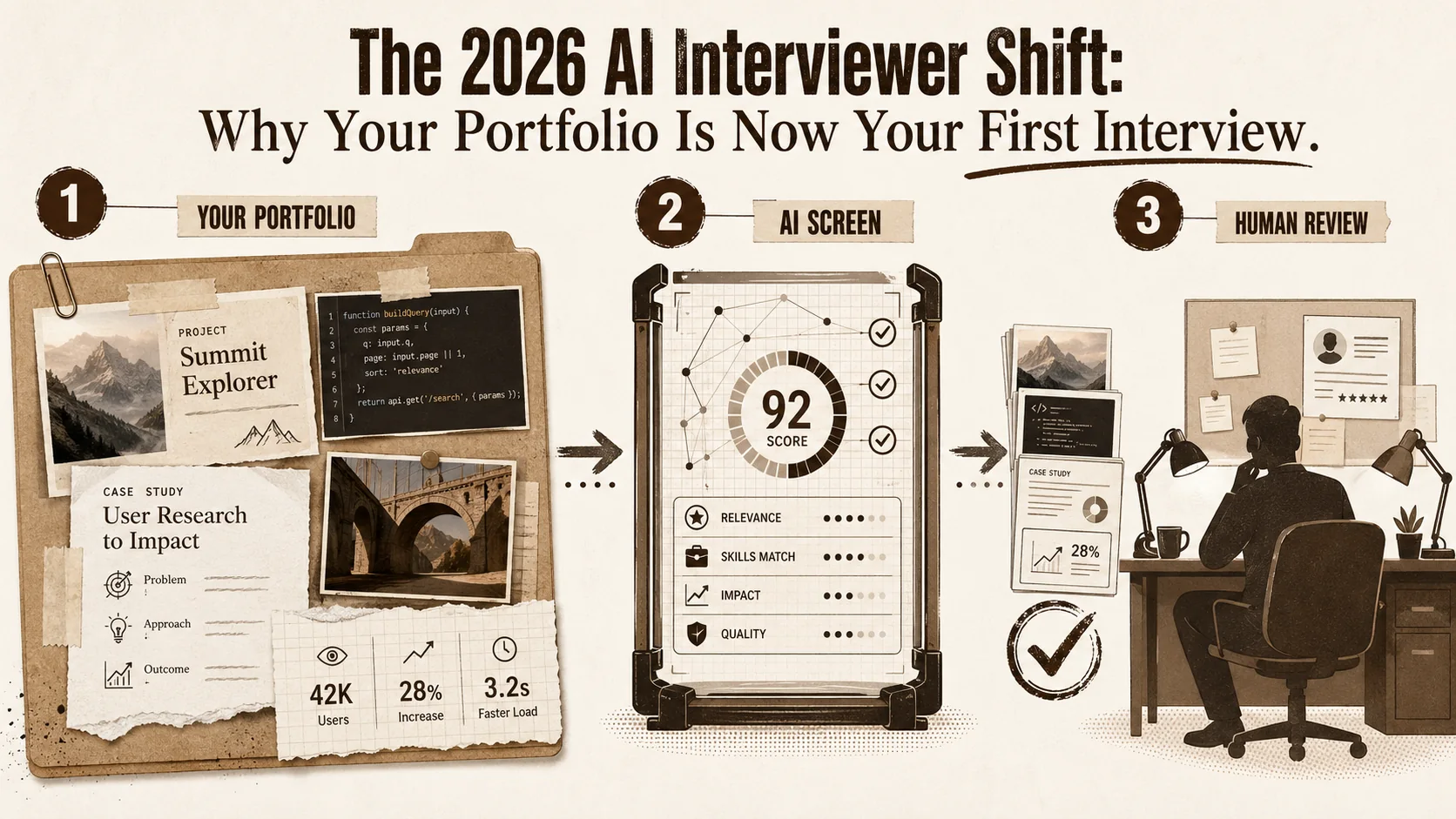
Imagine this: You've spent weeks perfecting your application for a dream role. Your resume is polished, your cover letter is tailored, and you hit submit with a surge of hope. But your application never reaches a human. Instead, it's processed by an AI system that scans your portfolio, scores it against a thousand data points, and—without a second thought—rejects it. You never get a reason. You never get a chance.
This isn't a dystopian future. It's the hiring reality of 2026.
The seismic shift in recruitment is here, and it's powered by artificial intelligence. Recent announcements from Google's 'Project HireMind' and Meta's 'Talent Scout AI' have confirmed what industry insiders have long predicted: AI-driven pre-screening is becoming the standard first gatekeeper in the hiring pipeline. According to LinkedIn's 2026 Hiring Report, a staggering 42% of tech companies now use AI tools to scan and evaluate candidate portfolios before any human review.
Your static resume is no longer your primary advocate. Your portfolio is. And if it's not structured for an AI interviewer, you're already at a disadvantage. This article will guide you through understanding this new landscape and, most importantly, show you how to build and optimize a portfolio that not only passes the AI gatekeeper but impresses the human hiring manager waiting on the other side.
The Rise of the AI Interviewer: From Sci-Fi to Standard Practice
42% of tech companies now use AI tools to scan candidate portfolios before human review, according to LinkedIn's 2026 Hiring Report. Systems like Google's Project HireMind and Meta's Talent Scout AI evaluate skill verification, project depth, quantified impact, and communication clarity from your public GitHub repos, Behance projects, and portfolio pages.
The concept of automated hiring isn't new. Applicant Tracking Systems (ATS) have been filtering resumes by keywords for over a decade. But the new generation of AI portfolio screening tools represents a quantum leap in sophistication. They're not just parsing text; they're analyzing the substance of your work.
What Are These AI Systems Looking For?
Based on analysis of public announcements from Google, Meta, and other early adopters, these AI interviewers are trained to evaluate several key dimensions:
- Skill Verification: Matching your claimed skills (e.g., "React," "UX Design," "Data Visualization") against tangible evidence in your projects.
- Project Depth & Complexity: Assessing whether your work demonstrates problem-solving, not just task completion. An AI can gauge the sophistication of a code repository or the user journey in a design case study.
- Impact & Results: Scanning for quantifiable outcomes. Metrics like "increased conversion by 15%" or "reduced load time by 200ms" are high-signal data points.
- Collaboration & Process: Looking for signs of professional workflow, such as commit histories, project management tool integrations, or documented design thinking.
- Communication Clarity: Evaluating how well you articulate your role, challenges, and solutions in project descriptions.
As reported by TechCrunch on January 18, 2026, these systems create a "candidate fingerprint"—a multi-dimensional profile that ranks applicants before a recruiter ever sees a name. The implication is clear: to get an interview, you must first pass an algorithm.
How to Structure Your Portfolio for an AI (and the Human After)
Structure each project with dedicated pages, standardized H2/H3 headers, explicit STAR-method descriptions with quantified metrics, and plain-text technology lists -- this serves both machine parsers (Greenhouse, Lever, HireVue) and the human recruiter reviewing after the AI screen.
Optimizing for AI doesn't mean creating a robotic, keyword-stuffed page. It means building a portfolio with clear, machine-readable structure and rich, human-compelling substance. Think of it as writing for two audiences simultaneously.
1. Master the Foundational Hierarchy: Clear & Scannable Structure
AI systems rely on well-structured data. A messy, single-page scroll with no clear sections is difficult for both AI and humans to parse.
- Dedicated Project Pages: Each significant project should have its own page or clearly defined section. This allows the AI to isolate and evaluate work individually.
- Standardized Section Headers: Use clear, predictable headings.
## Project: E-Commerce Dashboard Redesign,### The Challenge,### My Role & Actions,### Technologies Used,### Results & Impact. - Semantic HTML & Markdown: When building your portfolio, clean code matters. Proper use of header tags (
<h1>,<h2>) and list elements helps AI understand content hierarchy. Platforms that generate clean, semantic code (like Popout give you an inherent advantage.
For a deeper dive into foundational portfolio structure, explore our guide on how to create a developer portfolio.
2. Weaponize Your Project Descriptions: The STAR Method on Steroids
The classic STAR (Situation, Task, Action, Result) method is your best friend here, but it needs to be explicit.
- Situation/Task (The Challenge): Be specific. Instead of "Built a website," write "The client needed a multilingual marketing site to enter the European market, with a 30% faster load time than their competitor."
- Action (Your Role): Use active voice and first-person. "I led the front-end development, implementing lazy loading and a headless CMS to decouple content from code." List technologies as text, not just logos.
- Result (The Impact): This is the most critical part for AI. Quantify everything.
- Weak: "Made the site faster."
- Strong: "Achieved a 45% reduction in Largest Contentful Paint (LCP), leading to a 20% decrease in bounce rate and an estimated 15% increase in lead generation."
3. Optimize for Skill Discovery: Make Your Tech Stack Obvious
Don't make the AI guess what you used.
- Textual Lists: Always list key technologies, frameworks, and tools in the body text of your project description. "This project utilized React, Next.js 14, Tailwind CSS, and Stripe for payments."
- File Names & Repos: If you link to code (e.g., GitHub), ensure repository names, READMEs, and file structures are clear. A
package.jsonfile is a goldmine of verifiable skills for an AI scanner. - Contextualize Skills: Show how you used a technology. "I used Python's Pandas library to clean and merge three disparate datasets, which revealed the key customer segmentation insight that drove the campaign."
4. Provide Authentic Proof: Beyond the Screenshot
A screenshot is a start, but evidence of a working, functional process is king.
- Live Links: Always link to a live, deployed version of the project. This is the ultimate proof of functionality.
- Code Repositories: Link to clean, well-documented public GitHub repos. Activity graphs and commit messages tell a story of consistent work. For designers, embed Behance case studies or Dribbble shots directly so the AI can parse visual context alongside text.
- Case Studies & Documentation: For larger projects, a short case study PDF or a detailed blog post walking through your decision-making process provides immense depth that AI can analyze.
- Multimedia: Short video walkthroughs (even 30 seconds) demonstrating a key feature or user flow are highly engaging for humans and provide rich data for AI video analysis tools.
The 2026 Portfolio Checklist: Pass the AI Gatekeeper
The eight elements AI screeners evaluate are: project structure (dedicated pages with H2/H3), STAR-format descriptions with metrics, plain-text tech stacks, live links and GitHub repos, keyword-rich bios, working LinkedIn/Dribbble/Behance links, fast mobile-optimized performance, and content freshness within 12-18 months.
Use this checklist to audit your existing portfolio or guide the creation of a new one.
| Portfolio Element | AI-Optimized Action | Human Benefit |
|---|---|---|
| Project Structure | Each project has a dedicated page/section with clear H2/H3 headers. | Creates a clean, professional, and easy-to-navigate experience. |
| Project Description | Follows an explicit Challenge > Action > Result format with quantified metrics. | Tells a compelling story about your problem-solving skills. |
| Technologies | Listed in plain text within descriptions, not just as icons. | Quickly shows recruiters your relevant tech stack. |
| Proof of Work | Includes live links, code repos, and/or detailed case studies. | Builds credibility and trust through transparency. |
| "About Me" / Bio | Contains keyword-rich summary of skills, specialties, and career goals. | Helps AI categorize your profile and gives humans a quick intro. |
| Contact & Links | Clear, working links to LinkedIn, GitHub, etc., with consistent branding. | Makes it easy for interested humans to connect. |
| Site Performance | Fast loading, mobile-optimized, with clean HTML/CSS. | AI can assess site quality; humans hate slow sites. |
| Content Freshness | Recent projects or updates (within the last 12-18 months). | Signals active skill development and engagement. |
Building a portfolio that ticks all these boxes can feel daunting. This is where modern portfolio builders shift from being a convenience to a strategic necessity. The right tool handles the technical optimization (clean code, speed, mobile responsiveness) so you can focus entirely on your content and narrative. When evaluating tools, consider how they facilitate this AI-ready structure. For a comprehensive look at the landscape, read our ultimate guide to portfolio builder alternatives in 2026.
Beyond the Algorithm: Preparing for the Human Interview
Once you pass AI screening, your portfolio becomes your interview script -- the detailed STAR descriptions double as talking points, prove communication skills, and give the interviewer a shared artifact to discuss collaboratively.
Passing the AI screen is your ticket to the real game. But here's the secret: a portfolio optimized for AI is also the perfect preparation for a human interview.
- Your Portfolio is Your Interview Script: The detailed project descriptions you wrote for the AI are now your talking points. You've already articulated the challenge, your actions, and the results.
- Demonstrates Communication Skills: A well-structured portfolio proves you can communicate complex work clearly—a highly sought-after soft skill.
- Provides a Shared Artifact: The interviewer will have your portfolio open. It becomes a collaborative document to discuss, moving the conversation from abstract questions to concrete examples of your work.
In this new paradigm, your portfolio is no longer a simple showcase; it's an interactive CV, a proof-of-work ledger, and your first interview performance, all in one.
The Strategic Advantage: Don't Just Adapt, Get Ahead
Professionals who optimize their portfolios for AI screening now gain a significant first-mover advantage -- most candidates are still submitting static PDFs while Greenhouse, Lever, and HireVue already integrate portfolio-scan modules into their pipelines.
The shift to AI-driven screening creates a temporary window of opportunity. Many professionals are still unaware of this change or are slow to adapt their materials. By proactively optimizing your portfolio now, you gain a significant competitive edge.
You're not just making your history visible to a machine; you're engaging in an act of strategic career storytelling. For a complementary perspective on how recruiters evaluate portfolios in those first critical seconds, read our analysis of the portfolio-first job search trend. And to understand how your portfolio's visual presentation maps to recruiter psychology, explore the portfolio handshake blueprint. You are curating the evidence that defines your professional value. In a market where the first handshake is digital and the first impression is algorithmic, the most prepared candidates will win.
The future of hiring is a conversation—and it starts with your portfolio talking to an AI. Make sure it's saying the right things.
Ready to build your AI-optimized, human-impressing portfolio? Focus on your story, and let a tool like Popout handle the technical execution. Create Your Popout Page in minutes and ensure you're ready for the 2026 hiring pipeline.
FAQ: AI Portfolio Screening & Modern Job Search
Q1: Is optimizing my portfolio for AI considered "gaming the system" or unethical? Not at all. This is about clear communication, not deception. You are structuring your authentic accomplishments in a way that both intelligent software and busy humans can easily understand and evaluate. It's akin to formatting a resume for an ATS—you're ensuring your true value isn't lost due to poor presentation.
Q2: Will AI hiring tools eliminate human recruiters? No. The consensus is that AI will handle the high-volume, initial screening phase, freeing up human recruiters and hiring managers to focus on what they do best: evaluating cultural fit, nuanced experience, and soft skills in later-stage interviews. The human element remains crucial for final decisions.
Q3: I'm a junior developer/designer with only small or academic projects. How can I compete? Depth matters more than quantity for AI. Focus on documenting your process thoroughly for 2-3 best projects. Write detailed READMEs explaining your technical choices. Even for a simple app, can you discuss the problem it solves, the trade-offs you considered, and what you learned? This demonstrates analytical thinking and communication skills that AI (and humans) value. Explore more early-career strategies in our career hub.
Q4: Should I create separate portfolios for different job types (e.g., front-end vs. full-stack roles)? Yes, this is a highly effective strategy. Tailoring your portfolio's highlighted projects and skill emphasis for specific roles makes you a stronger match for both AI filters and human reviewers. Many portfolio platforms allow you to create multiple pages or easily reorder content for this purpose.
Q5: How often should I update my portfolio to stay relevant? Aim for a quarterly review. Add new significant projects, update the technologies in your "skills" section, and refresh metrics on old projects if you have newer results. Regular updates signal active professional engagement, which is a positive signal.
Q6: Where can I learn more about building a powerful personal portfolio? We have a dedicated resource hub covering everything from inspiration to technical details. Start your journey at our comprehensive portfolio hub for articles, guides, and best practices.
Other Doved Studio projects
Related tools from the same studio you might find useful:
- Ralphable: Generate structured Claude Code skills that iterate until pass/fail criteria are met.
- Glean: Turn scrolling time into a daily action plan. Capture, process, execute.
- Doved Studio: Studio indie derrière cette app et une dizaine d'autres outils.
Written by
popout
Content Team