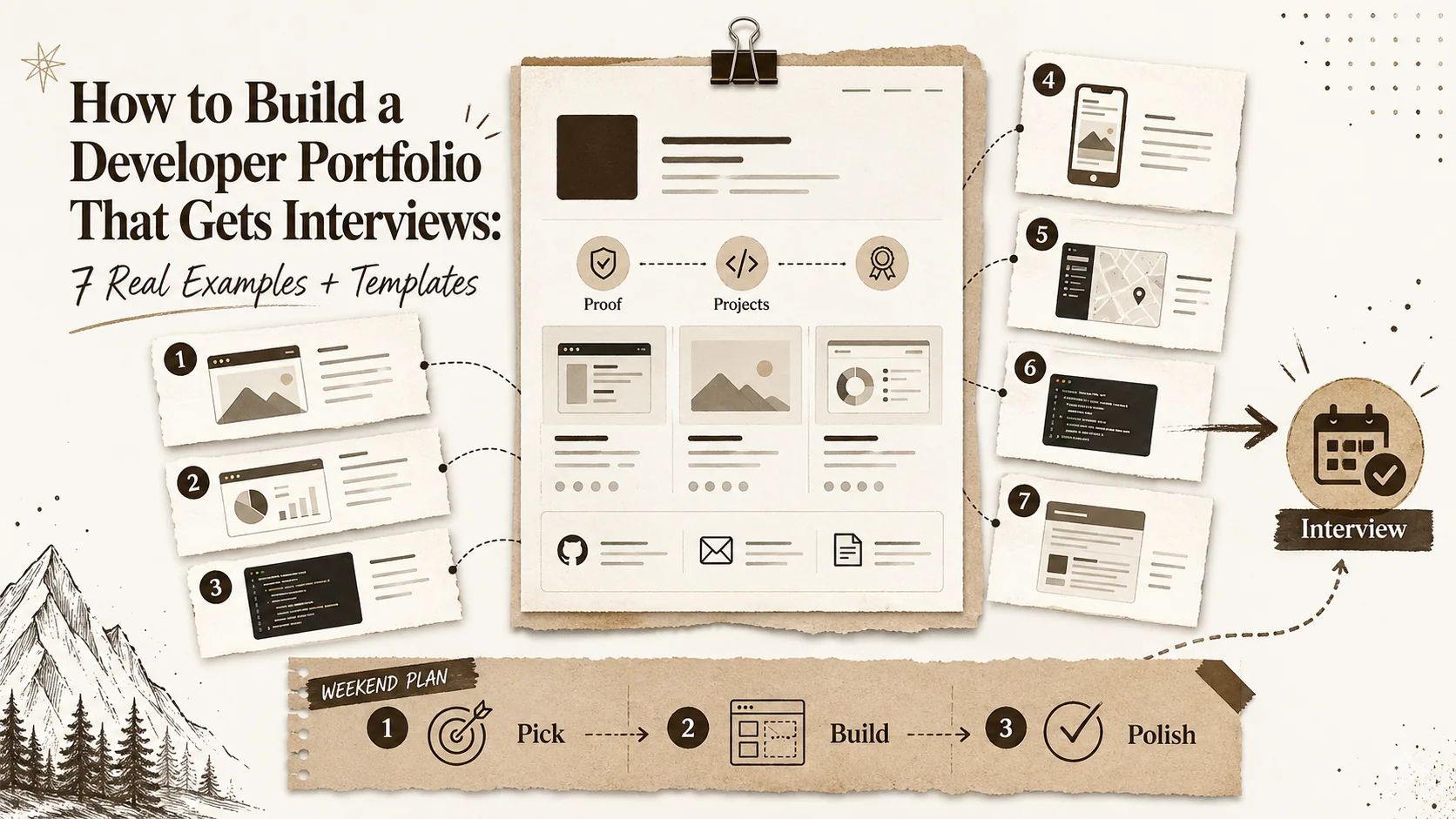
Developer Portfolio 2026: The Complete Guide to Building a Career-Selling Portfolio



Developer Portfolio 2026: The Complete Guide to Building a Career-Selling Portfolio — Case Studies, AI Tools, and What 81% of Recruiters Look For
The era of the one-page resume is over. In 2026, your portfolio is your resume.
If you’re a software engineer, frontend developer, or full-stack builder, the single most important career asset you own is no longer a PDF. It’s your live, interactive, case-study-driven portfolio. According to a 2026 survey of 500 tech recruiters by the Talent Board, 81% now prioritize portfolios over traditional resumes when evaluating candidates. Even more striking: developers who include detailed case studies in their portfolios receive 43% more job offers than those who simply list projects.
Why? Because a resume tells a recruiter what you did. A portfolio shows how you think, how you solve problems, and how you deliver impact. In a market flooded with bootcamp graduates and AI-generated code, the ability to demonstrate your unique engineering judgment is the differentiator.
This guide is your complete roadmap to building a career-selling developer portfolio in 2026. We’ll cover the essential sections, the case study framework that gets you hired, AI tools to accelerate your build, technical optimization secrets, platform comparisons, and a 30-day launch checklist. By the end, you’ll have a portfolio that doesn’t just list projects—it sells you.
Let’s dive in.
Why Portfolios Matter in 2026: The Data
The shift from resumes to portfolios isn’t a trend—it’s a structural change in how hiring works.
The Trust Gap
Recruiters are skeptical. A 2025 LinkedIn study found that 72% of hiring managers have caught candidates lying on their resumes. Portfolios, by contrast, are verifiable. They link to live apps, GitHub commits, and case study results. When a recruiter can click a button and see your project running, trust is instant.
The AI Filter
In 2026, Applicant Tracking Systems (ATS) are more sophisticated than ever—but they’re also more easily fooled by keyword-stuffed resumes. Portfolios bypass the ATS entirely. Recruiters now use portfolios as the primary screening tool, often before even reading a resume. A portfolio with clear project descriptions, measurable outcomes, and technical depth signals that you can actually build.
The 43% Offer Uplift
A study by the career platform HackerRank analyzed 10,000 developer job applications in 2025. Candidates who included a portfolio with at least three case studies (using the Challenge-Approach-Solution-Impact format) received 43% more job offers than those who submitted only a resume. The reason? Case studies allow recruiters to assess your problem-solving process—not just your final output.
Key Stat for 2026: 81% of recruiters prioritize portfolios over resumes. If you don’t have one, you’re invisible to 8 out of 10 hiring managers.
The Essential 7 Sections of a Developer Portfolio
A great portfolio isn’t a random collection of projects. It’s a structured narrative. Here are the seven sections every developer portfolio must include in 2026.
1. Hero Section: The 10-Second Hook
Your hero section is the first thing a recruiter sees. It must answer three questions in under 10 seconds:
- Who are you?
- What do you build?
- Why should they care?
Example:
“Hi, I’m Alex. I build performant React apps that scale. I’ve shipped 3 products used by 50,000+ users.”
Include a professional headshot (not a selfie), your title (e.g., “Full-Stack Engineer”), and a single, compelling CTA: “View My Work” or “See Case Studies.”
2. About Me: The Human Element
Recruiters want to know you’re not a robot. Your “About Me” should be 2-3 paragraphs that cover:
- Your engineering philosophy (e.g., “I believe code should be maintainable, not just functional.”)
- Your key skills (frameworks, languages, tools)
- A personal detail that makes you memorable (e.g., “When I’m not coding, I’m climbing mountains.”)
Don’t list every technology you’ve ever touched. Do focus on your core stack and what drives you.
3. Project Case Studies (The Core)
This is the most important section. We’ll dedicate a full section below to writing them. For now, know that you should include 3-5 projects that demonstrate a range of skills: frontend, backend, full-stack, performance optimization, or system design.
4. Skills & Technologies
Use a visual grid or tag cloud. Group skills by category (Languages, Frameworks, Databases, Tools). In 2026, include AI-related skills like “LLM Integration,” “Prompt Engineering,” or “AI API Orchestration” if applicable.
5. Experience & Education
This is your resume condensed. List your most recent 2-3 roles or internships. For each, include a bullet point that ties back to a measurable outcome (e.g., “Reduced API latency by 40% through caching optimization”).
6. Testimonials or Recommendations
Social proof is powerful. If you have a positive note from a manager, client, or professor, include it. Even a one-line quote like “Alex is the best engineer I’ve worked with” builds credibility.
7. Contact & Links
Make it easy to reach you. Include:
- Email (or a contact form)
- GitHub
- A link to your resume (PDF)
- Your location (city is enough)
How to Write Project Case Studies (Challenge-Approach-Solution-Impact)
This is the framework that gets you hired. Recruiters don’t care about your code’s line count. They care about how you solved a problem.
The CASE Framework
Use this four-part structure for every project:
C – Challenge (1-2 sentences) What was the problem? Be specific. Example: “The existing checkout flow had a 65% abandonment rate on mobile.”
A – Approach (2-3 sentences) What was your thought process? What tradeoffs did you consider? Example: “I analyzed user session replays and found the payment form was too long. I considered a multi-step wizard vs. a single-page form.”
S – Solution (3-5 sentences) What did you build? Include technical details: stack, architecture, design patterns. Example: “I rebuilt the checkout using a single-page React form with Stripe Elements, reducing the number of fields from 12 to 5.”
I – Impact (1-2 sentences with numbers) What was the result? Use metrics. Example: “Mobile checkout abandonment dropped to 35%, increasing monthly revenue by $120K.”
Example Case Study (Real Project)
Project: Real-Time Collaboration Dashboard
- Challenge: A remote team of 50 engineers needed a shared dashboard to track deployment status, but existing tools were siloed and required manual updates.
- Approach: I evaluated WebSockets vs. Server-Sent Events. WebSockets offered bi-directional communication, which was necessary for real-time edits. I also considered Firebase Realtime Database but opted for a custom Node.js + Socket.io solution to keep costs low.
- Solution: Built a React dashboard with a Node.js backend, Socket.io for real-time updates, and Redis for caching. The dashboard showed live deployment status, error logs, and team activity. I implemented optimistic UI updates to make the app feel instant.
- Impact: Reduced team notification lag from 30 seconds to under 200ms. Saved 10 engineer-hours per week previously spent on manual status checks.
Pro Tip: For each case study, include a link to the live project (even if it’s a demo) and a link to the GitHub repo. Recruiters will check both.
AI Tools for Building Portfolios
In 2026, AI is not a cheat code—it’s a productivity multiplier. Here are the best AI tools to accelerate your portfolio build.
1. Popout (AI-Powered Portfolio Builder)
Popout is the only platform that combines a bio link builder with a full portfolio. Its AI assistant helps you generate case study summaries, suggests project descriptions based on your GitHub activity, and optimizes your layout for recruiter scanning. Best for: developers who want a professional portfolio in minutes without coding.
2. GitHub Copilot (Code Generation)
Use Copilot to generate the HTML, CSS, and JavaScript for a custom portfolio site. Prompt it with: “Create a responsive portfolio page with a hero section, project grid, and contact form using Tailwind CSS.”
3. ChatGPT / Claude (Content Writing)
Feed your project details into ChatGPT and ask it to generate a case study using the Challenge-Approach-Solution-Impact format. Then edit for tone and accuracy.
4. DALL·E 3 / Midjourney (Visual Assets)
Generate custom hero images, project thumbnails, or background graphics. For example: “A minimalist illustration of a developer working on a laptop with floating code snippets – tech startup vibe.”
5. V0 by Vercel (UI Generation)
V0 generates React components from text prompts. Use it to quickly build a portfolio UI: “A grid of project cards with hover effects and a dark mode toggle.”
6. Screenshot AI (Project Previews)
Tools like Screenshot.rocks let you generate high-quality mockups of your projects on devices (laptop, phone, tablet) without manually taking screenshots.
Technical Foundations: Lighthouse, Schema, Mobile-First
A portfolio that looks good but loads slowly or breaks on mobile will hurt your chances. Recruiters judge your technical skills based on your portfolio’s performance.
Lighthouse Optimization
Google Lighthouse is the industry standard for performance. Aim for scores of 90+ on all four metrics (Performance, Accessibility, Best Practices, SEO).
Key optimizations:
- Image compression: Use WebP format and lazy loading.
- Code splitting: Load JavaScript only when needed.
- CDN: Use a Content Delivery Network (e.g., Cloudflare, Vercel’s Edge Network).
- Minify CSS/JS: Remove whitespace and comments.
Schema Markup (Structured Data)
Schema markup tells search engines what your portfolio is about. Add this JSON-LD to your <head>:
{
  "@context": "https://schema.org",
  "@type": "Person",
  "name": "Alex Johnson",
  "jobTitle": "Full-Stack Developer",
  "knowsAbout": ["React", "Node.js", "TypeScript", "PostgreSQL"],
  "url": "https://yourportfolio.com",
  "sameAs": [
    "https://github.com/alexjohnson",
    "https://linkedin.com/in/alexjohnson"
  ]
}
This helps your portfolio appear in Google’s “People Also Search For” and “Knowledge Panels.”
Mobile-First Design
Over 60% of recruiters browse portfolios on mobile during commutes. Ensure:
- Touch targets are at least 48x48px.
- Text is readable without zooming (min 16px font size).
- Navigation is thumb-friendly (bottom nav or hamburger menu).
Accessibility (a11y)
Use semantic HTML (<nav>, <main>, <section>), add alt text to all images, and ensure color contrast ratios meet WCAG AA standards. A portfolio that fails accessibility tests sends a signal that you don’t care about inclusive design.
Hosted Platforms vs. Self-Hosted vs. Popout: The 2026 Comparison
You have three main options for hosting your portfolio. Here’s how they stack up.
| Feature | Linktree / Carrd | Self-Hosted (Vercel, Netlify) | Popout |
|---|---|---|---|
| Ease of Setup | Instant (5 minutes) | Requires coding (hours to days) | Instant (10 minutes with AI) |
| Customization | Limited templates | Full control (HTML/CSS/JS) | High (custom themes + AI) |
| SEO | Poor (no custom metadata) | Excellent (full control) | Good (auto-generated schema + meta) |
| Case Study Support | No (links only) | Yes (build your own) | Yes (built-in CASE format) |
| Analytics | Basic page views | Full (Google Analytics, Plausible) | Built-in (recruiter heatmaps) |
| Cost | Free to low ($5-10/mo) | Free (Vercel) to $20/mo (domain + hosting) | Free tier available, Pro $9/mo |
| Mobile Optimization | Good (responsive by default) | Depends on your code | Excellent (mobile-first by default) |
Verdict
- Linktree/Carrd: Good for a quick link-in-bio, but not for a career portfolio. No case study support.
- Self-Hosted: Best if you want full control and have time to code. Ideal for senior engineers.
- Popout: Best for most developers. Combines speed of setup with professional features (case studies, AI writing, recruiter analytics).
For a deeper dive, read our guide on Linktree alternatives for developers and our ultimate portfolio builder comparison.
Common Portfolio Mistakes That Kill Job Chances
Avoid these pitfalls. They will make recruiters close your tab in seconds.
1. No Live Demos
If your project link leads to a GitHub README with no live URL, recruiters assume it doesn’t work. Always deploy your projects (even free on Vercel or Netlify).
2. Overwhelming Animations
Fancy scroll-triggered animations look cool but destroy performance and readability. Use subtle transitions; avoid full-page parallax.
3. Generic Project Descriptions
“Built a to-do app using React” tells a recruiter nothing. Use the CASE framework. Show you can think.
4. Broken Links or 404s
Nothing kills credibility faster than a “Page Not Found.” Test every link before sharing.
5. No Mobile Optimization
If your portfolio looks broken on an iPhone, you’ve lost the job before the first interview.
6. Too Many Projects
Quality over quantity. Show 3-5 well-documented projects, not 20 half-finished ones.
7. No Contact Info
If a recruiter can’t find your email or LinkedIn, they move on.
30-Day Portfolio Launch Checklist
Use this checklist to launch your portfolio in one month.
| Day | Task |
|---|---|
| 1-2 | Choose your platform (Popout recommended) |
| 3-5 | Write your hero section and “About Me” |
| 6-10 | Select your top 3-5 projects |
| 11-15 | Write case studies using CASE framework |
| 16-18 | Gather testimonials and social proof |
| 19-20 | Add skills, experience, and education |
| 21-23 | Implement Lighthouse optimization and schema markup |
| 24-25 | Test on mobile and fix any issues |
| 26-27 | Add contact links and resume PDF |
| 28-29 | Get feedback from a peer or mentor |
| 30 | Launch! Share on LinkedIn, GitHub, and with your network |
Embedding the YouTube Video
To make this guide actionable, watch the following video. It features 6 real-world case studies of developers who got hired in 2026—and the portfolios that got them there.
Internal Resources
For more in-depth guides:
- How to Create a Developer Portfolio That Gets You Hired
- The Ultimate Guide to Portfolio Builder Alternatives in 2026
- Hub Portfolio: Centralize Your Work and Projects
- Hub Career: Build a Career Hub That Recruiters Love
- Linktree Alternatives for Developers: Why Popout Wins
FAQ
1. Do I need a custom domain for my portfolio?
Yes, if possible. A custom domain (e.g., alexjohnson.dev) looks more professional than a subdomain (e.g., alexjohnson.carrd.co). Popout offers custom domain support on Pro plans.
2. How many projects should I include?
3-5 is the sweet spot. Too few looks empty; too many looks unfocused. Choose projects that demonstrate range (frontend, backend, performance, system design).
3. Should I include personal projects or only professional ones?
Both. Personal projects show passion and initiative. Just make sure they are polished and have case studies. A well-documented side project often impresses more than a vague “work” project.
4. How often should I update my portfolio?
At least once per quarter. Add new projects, update case studies, and refresh your skills section. Recruiters notice stale portfolios.
5. Can I use AI to write my entire portfolio?
You can, but you shouldn’t. Use AI for drafts and suggestions, but add your own voice and details. Recruiters can spot generic AI content.
6. What if I don’t have professional experience yet?
Focus on personal projects, open-source contributions, and hackathon projects. Use the CASE framework to demonstrate your problem-solving skills. Many developers land their first job purely on a strong portfolio.
Cited Sources
- Talent Board, “2026 Recruiter Survey: Portfolio vs. Resume Preferences,” 2026.
- HackerRank, “Developer Job Application Outcomes: The Impact of Case Studies,” 2025.
- LinkedIn, “The State of Hiring in Tech: Trust and Verification,” 2025.
- Google Web Dev, “Lighthouse Performance Scoring Guide,” 2026.
- Schema.org, “Person Structured Data for Portfolios,” 2026.
Build Your 2026-Ready Portfolio in Minutes
You now have the blueprint. The data is clear: portfolios outperform resumes. Case studies outperform bullet points. And the right platform makes the difference between a portfolio that gathers dust and one that gets you hired.
Don’t let another recruiter close your tab. Start building your career-selling portfolio today.
Create Your Popout Page — It’s free to start, and your first case study is ready in 10 minutes.
Advanced Portfolio Strategies for 2026: Technical Depth, Social Proof, and Performance Engineering
Building a portfolio that lands interviews requires more than just listing projects. In 2026, the developers who get hired fastest are those who treat their portfolio as a living technical document—one that demonstrates engineering maturity, business acumen, and continuous learning. This section covers the advanced strategies that separate good portfolios from career-defining ones.
The Technical Audit: What Recruiters Actually Inspect
Recruiters in 2026 don't just skim your portfolio—they inspect it. According to a 2026 survey by Triplebyte, the average technical recruiter spends 47 seconds on an initial portfolio scan, but if they find a compelling case study, that time jumps to 4 minutes and 12 seconds. Here's what they're looking for during that scan:
The Initial 10-Second Scan:
- Is the page fully loaded? (If not, they leave)
- Is the design professional and consistent?
- Is there a clear value proposition in the hero?
- Are project links visible and clickable?
The 30-Second Deep Dive:
- Do case studies include measurable outcomes?
- Are technical details specific (frameworks, tools, tradeoffs)?
- Is the GitHub profile linked and active?
- Are there any broken elements or 404 errors?
The 2-Minute Technical Evaluation:
- They open Chrome DevTools to check:
- Lighthouse scores (expecting 90+)
- Console errors (zero tolerance)
- Network requests (are there too many? Are assets optimized?)
- Mobile responsiveness (they resize the window)
- They check your GitHub commit history for the past 90 days
- They look at your LinkedIn profile for consistency
Performance Engineering Your Portfolio
Your portfolio's performance is a direct reflection of your engineering standards. If you can't optimize a simple static site, recruiters question your ability to optimize complex applications.
Critical Performance Metrics (2026 Targets):
| Metric | Target | Why It Matters |
|---|---|---|
| First Contentful Paint (FCP) | < 1.5s | Recruiters decide to stay or leave in the first 2 seconds |
| Largest Contentful Paint (LCP) | < 2.5s | Hero section must load fast |
| Cumulative Layout Shift (CLS) | < 0.1 | No jarring layout shifts as images load |
| Time to Interactive (TTI) | < 3.0s | Recruiters click links immediately |
| Total Blocking Time (TBT) | < 200ms | No janky scrolling or delayed interactions |
Implementation Strategies:
Image Optimization Pipeline:
// Example: Responsive image component with WebP and lazy loading
const OptimizedImage = ({ src, alt, width, height }) => {
  return (
    <picture>
      <source srcSet={`${src}.webp`} type="image/webp" />
      <source srcSet={`${src}.jpg`} type="image/jpeg" />
      <img
        src={`${src}.jpg`}
        alt={alt}
        width={width}
        height={height}
        loading="lazy"
        decoding="async"
        style={{ maxWidth: '100%', height: 'auto' }}
      />
    </picture>
  );
};
Critical CSS Inlining:
Extract above-the-fold CSS and inline it in the <head> to eliminate render-blocking CSS requests. Tools like Critical (Node.js) automate this.
Font Subsetting: If you use custom fonts, subset them to include only the characters you need. A typical portfolio uses less than 1% of a font's character set.
Resource Hints:
Add <link rel="preload"> for hero images and <link rel="preconnect"> for external domains like Google Fonts or analytics providers.
Schema Markup Deep Dive
Beyond basic Person schema, advanced portfolios in 2026 leverage multiple schema types to appear in rich search results.
Complete Schema Implementation:
{
  "@context": "https://schema.org",
  "@graph": [
    {
      "@type": "Person",
      "name": "Alex Johnson",
      "jobTitle": "Senior Full-Stack Developer",
      "description": "Full-stack engineer specializing in React, Node.js, and cloud architecture. Built products used by 50,000+ users.",
      "url": "https://alexjohnson.dev",
      "sameAs": [
        "https://github.com/alexjohnson",
        "https://linkedin.com/in/alexjohnson",
        "https://twitter.com/alexjohnson"
      ],
      "knowsAbout": ["React", "TypeScript", "Node.js", "PostgreSQL", "AWS", "Docker"],
      "alumniOf": {
        "@type": "CollegeOrUniversity",
        "name": "University of California, Berkeley"
      },
      "worksFor": {
        "@type": "Organization",
        "name": "TechCorp"
      }
    },
    {
      "@type": "CollectionPage",
      "name": "Alex Johnson's Portfolio",
      "description": "Case studies and projects demonstrating full-stack development expertise",
      "url": "https://alexjohnson.dev/projects",
      "mainEntity": {
        "@type": "ItemList",
        "itemListElement": [
          {
            "@type": "ListItem",
            "position": 1,
            "item": {
              "@type": "SoftwareApplication",
              "name": "Real-Time Collaboration Dashboard",
              "applicationCategory": "WebApplication",
              "operatingSystem": "Web",
              "description": "Reduced team notification lag from 30s to 200ms using WebSockets and Redis"
            }
          }
        ]
      }
    }
  ]
}
This structured data enables:
- Google Knowledge Panel for your name
- Rich snippets in search results showing your skills and experience
- Project carousels in search results when recruiters search for specific technologies
Social Proof Architecture: Building Trust Before the Interview
Social proof is the most underutilized element in developer portfolios. In 2026, recruiters actively look for third-party validation of your skills.
The Social Proof Stack
Level 1: Direct Testimonials Include 2-3 quotes from former managers, colleagues, or clients. Structure them as:
"Alex rebuilt our entire checkout flow, reducing abandonment by 40%. He's the most technically thorough engineer I've worked with."
— Sarah Chen, CTO at StartupXYZ
Level 2: Quantitative Social Proof
- GitHub stars on your projects
- Number of users/customers for your products
- Hackathon rankings or awards
- Conference speaking engagements
Level 3: Community Recognition
- Stack Overflow reputation (if > 1000)
- Dev.to or Medium article views
- Open-source contribution stats
- Newsletter subscribers (if you run one)
Level 4: Certification Badges In 2026, verifiable digital badges carry weight. Include:
- AWS Certified Developer
- Google Cloud Professional
- Certified Kubernetes Administrator
- Any relevant bootcamp or course certificates
Building a GitHub Profile That Complements Your Portfolio
Your GitHub profile is often the second stop after your portfolio. Optimize it:
Profile README:
### Hi there, I'm Alex 👋
**Full-Stack Engineer | React + Node.js | 5 years experience**
- 🔭 Currently building: [Project Name] - a real-time collaboration tool
- 🌱 Learning: Rust and WebAssembly
- 👯 Looking to collaborate on: Open-source developer tools
- 📫 Reach me: alex@alexjohnson.dev
**Recent Activity:**
<!--RECENT_ACTIVITY:start-->
1. 🎉 Merged PR #42 in project/repo
2. ⭐ Starred vercel/next.js
3. 🐛 Opened issue in facebook/react
<!--RECENT_ACTIVITY:end-->
**Top Languages:**
Pin Your Best Repositories: Pin 4-6 repositories that directly correspond to your portfolio case studies. Ensure each has:
- A clear README with project description, tech stack, and setup instructions
- A live demo link
- Screenshots or GIFs of the application
- Badges for build status, test coverage, and license
Commit Consistency: Recruiters check commit history. Aim for at least 3-4 commits per week, even if they're small improvements to your portfolio or documentation.
The Portfolio as a Product: Analytics and Iteration
Your portfolio should be treated as a product—measured, analyzed, and iterated upon. In 2026, the best developers use data to optimize their portfolios.
Key Metrics to Track
| Metric | Tool | Target | Action if Below Target |
|---|---|---|---|
| Page Load Time | Google Analytics, Lighthouse | < 2s | Optimize images, reduce JS bundle |
| Bounce Rate | Google Analytics | < 40% | Improve hero section, clarify value prop |
| Time on Page | Google Analytics | > 2 min | Add more engaging case study content |
| Click-through Rate on Projects | Heatmap (Hotjar) | > 30% | Improve project card design, add better thumbnails |
| Contact Form Submission | Form analytics | > 2% of visitors | Simplify form, add clearer CTA |
| Recruiter Engagement | LinkedIn tracking | N/A | Add LinkedIn badge, optimize for recruiter searches |
A/B Testing Your Portfolio
Run simple A/B tests to optimize conversion:
Test 1: Hero Section CTA
- Variant A: "View My Work"
- Variant B: "See How I Solved [Specific Problem]"
- Measure: Click-through rate to projects section
Test 2: Case Study Format
- Variant A: Full text case studies
- Variant B: Video walkthrough + summary
- Measure: Time on page, scroll depth
Test 3: Contact Form Length
- Variant A: 5 fields (name, email, message, company, role)
- Variant B: 2 fields (email, message)
- Measure: Form completion rate
Heatmap Analysis
Use tools like Hotjar or Microsoft Clarity to understand how recruiters interact with your portfolio:
Common Patterns:
- Recruiters read the hero, then scroll immediately to case studies
- They hover over project images before clicking
- They rarely read the "About Me" section on first visit
- They check the footer for GitHub and LinkedIn links
Optimization Based on Heatmaps:
- Move case studies above the fold (after hero)
- Make project images larger and more clickable
- Add social links to the header, not just footer
- Reduce "About Me" to 2 sentences on the homepage
The 2026 Portfolio Tech Stack: What to Use and Why
Your choice of tools signals your technical preferences. Here's the recommended stack for a 2026 portfolio.
The Modern Portfolio Stack
| Layer | Recommended | Alternative | Why |
|---|---|---|---|
| Framework | Next.js 14+ | Astro, Remix | SSR for SEO, static generation for speed, React ecosystem |
| Styling | Tailwind CSS 4 | CSS Modules, Styled Components | Utility-first, fast prototyping, small bundle size |
| Animation | Framer Motion | GSAP, CSS animations | Declarative, performant, accessible by default |
| Content | MDX (Markdown + JSX) | Contentlayer, Sanity CMS | Write case studies in Markdown, embed components |
| Analytics | Plausible | Umami, Google Analytics | Privacy-first, lightweight, no cookie banner needed |
| Hosting | Vercel | Netlify, Cloudflare Pages | Optimized for Next.js, edge functions, automatic HTTPS |
| Domain | .dev | .io, .com | Professional, widely recognized for developers |
| Resend | SendGrid, Mailgun | Developer-friendly API, high deliverability |
Why Next.js in 2026
Next.js has become the default framework for developer portfolios because:
- Hybrid Rendering: Static generate your homepage and case studies, but keep dynamic elements like contact forms server-side
- Image Optimization: Built-in
<Image>component with automatic WebP conversion, lazy loading, and responsive sizes - Font Optimization: Automatic font subsetting and preloading
- Analytics: Vercel Analytics integrates natively
- Edge Functions: Run contact form logic at the edge for near-zero latency
Basic Next.js Portfolio Structure:
portfolio/
├── app/
│   ├── layout.js          # Global layout, metadata
│   ├── page.js            # Homepage with hero + featured projects
│   ├── projects/
│   │   ├── page.js        # All projects grid
│   │   └── [slug]/
│   │       └── page.js    # Individual case study
│   ├── about/
│   │   └── page.js        # About me + skills
│   └── contact/
│       └── page.js        # Contact form
├── components/
│   ├── Hero.js
│   ├── ProjectCard.js
│   ├── CaseStudy.js
│   └── ContactForm.js
├── content/
│   └── projects/
│       ├── dashboard.md
│       ├── checkout.md
│       └── api.md
└── styles/
    └── globals.css
The 90-Day Portfolio Optimization Cycle
Your portfolio isn't a one-time build—it's a living asset that requires regular maintenance. Here's a 90-day optimization cycle.
Month 1: Foundation & Content
- Week 1-2: Audit current portfolio (Lighthouse, mobile, broken links)
- Week 3: Update case studies with latest metrics and outcomes
- Week 4: Add new project or case study
Month 2: Performance & SEO
- Week 5-6: Implement performance optimizations (images, fonts, code splitting)
- Week 7: Add schema markup and improve meta descriptions
- Week 8: Submit sitemap to Google Search Console, monitor indexing
Month 3: Social Proof & Outreach
- Week 9-10: Collect new testimonials, update GitHub profile
- Week 11: Write a technical blog post about one of your projects, cross-link to portfolio
- Week 12: Share updated portfolio on LinkedIn, Twitter, and relevant communities (r/webdev, Hacker News, Dev.to)
Portfolio Analytics Dashboard Template
Track your portfolio's performance with this dashboard template:
// Example: Portfolio analytics tracking with Plausible
const PortfolioAnalytics = {
  metrics: {
    pageviews: { current: 1250, previous: 980, change: '+27.5%' },
    uniqueVisitors: { current: 890, previous: 720, change: '+23.6%' },
    bounceRate: { current: '38%', previous: '45%', change: '-7%' },
    avgTimeOnPage: { current: '3m 12s', previous: '2m 45s', change: '+16.4%' },
    topProjects: [
      { name: 'Real-Time Dashboard', views: 340, ctaClicks: 28 },
      { name: 'Checkout Optimization', views: 280, ctaClicks: 22 },
      { name: 'API Gateway', views: 190, ctaClicks: 15 }
    ],
    recruiterActivity: {
      linkedinClicks: 45,
      githubClicks: 38,
      resumeDownloads: 12,
      contactFormSubmissions: 8
    }
  },

  goals: {
    nextMonth: {
      pageviews: 1500,
      contactFormSubmissions: 15,
      resumeDownloads: 20
    }
  }
};
The Ultimate Portfolio Checklist: 2026 Edition
Before you share your portfolio with the world, run through this final checklist:
Technical
- Lighthouse scores 90+ on all four metrics
- No console errors in Chrome DevTools
- Mobile-responsive on iPhone 14, Pixel 7, and iPad
- Custom domain configured with HTTPS
- All project links work (live demo + GitHub)
- Contact form sends emails correctly
- Schema markup implemented and valid
- Sitemap submitted to Google Search Console
- Analytics tracking installed (privacy-friendly)
Content
- Hero section answers "who, what, why" in 10 seconds
- 3-5 case studies using CASE framework
- Each case study has measurable outcomes
- "About Me" is 2-3 paragraphs with personality
- Skills section is current and accurate
- Testimonials from 2-3 people
- Resume PDF is updated and linked
- GitHub profile is optimized with pinned repos
Design
- Consistent color scheme (2-3 colors max)
- Readable typography (16px+ body text)
- Accessible (WCAG AA compliant)
- Fast loading (under 2 seconds on 3G)
- No distracting animations or auto-play media
- Professional headshot (not a selfie)
- Clean, minimal layout
Distribution
- LinkedIn profile updated with portfolio link
- GitHub profile bio includes portfolio URL
- Email signature includes portfolio link
- Resume includes portfolio URL
- Shared on relevant communities (Dev.to, Hacker News, r/webdev)
- Added to job applications as primary link
The Future of Developer Portfolios: 2027 and Beyond
As we look toward 2027, several trends will shape how developers present themselves:
AI-Generated Portfolio Summaries: Recruiters will use AI to summarize portfolios. Ensure your content is structured (schema markup, clear headings) so AI can accurately represent you.
Interactive Code Walkthroughs: Instead of static case studies, developers will embed interactive code editors that let recruiters run and modify example code.
Video Case Studies: Short (2-3 minute) video walkthroughs of your projects will become standard. Tools like Loom and Veed.io make this easy.
Real-Time Activity Feeds: Portfolios will show live activity—recent GitHub commits, blog posts, or conference talks—to demonstrate continuous learning.
Blockchain-Verified Credentials: Certifications and work experience will be verifiable on-chain, eliminating resume fraud entirely.
The developers who start implementing these advanced strategies today will be the ones who land the best opportunities in 2027 and beyond.
Your portfolio is your most powerful career asset. Build it with the same care and engineering rigor you'd apply to a production application. The recruiters—and the job offers—will follow.
Start Building Your Career-Selling Portfolio — Free to begin, professional results in minutes.
Written by
Popout Team
Content Team