

The 2026 Portfolio 'First Click' Test: How to Optimize Your Bio Link for the 8-Second Recruiter Scan


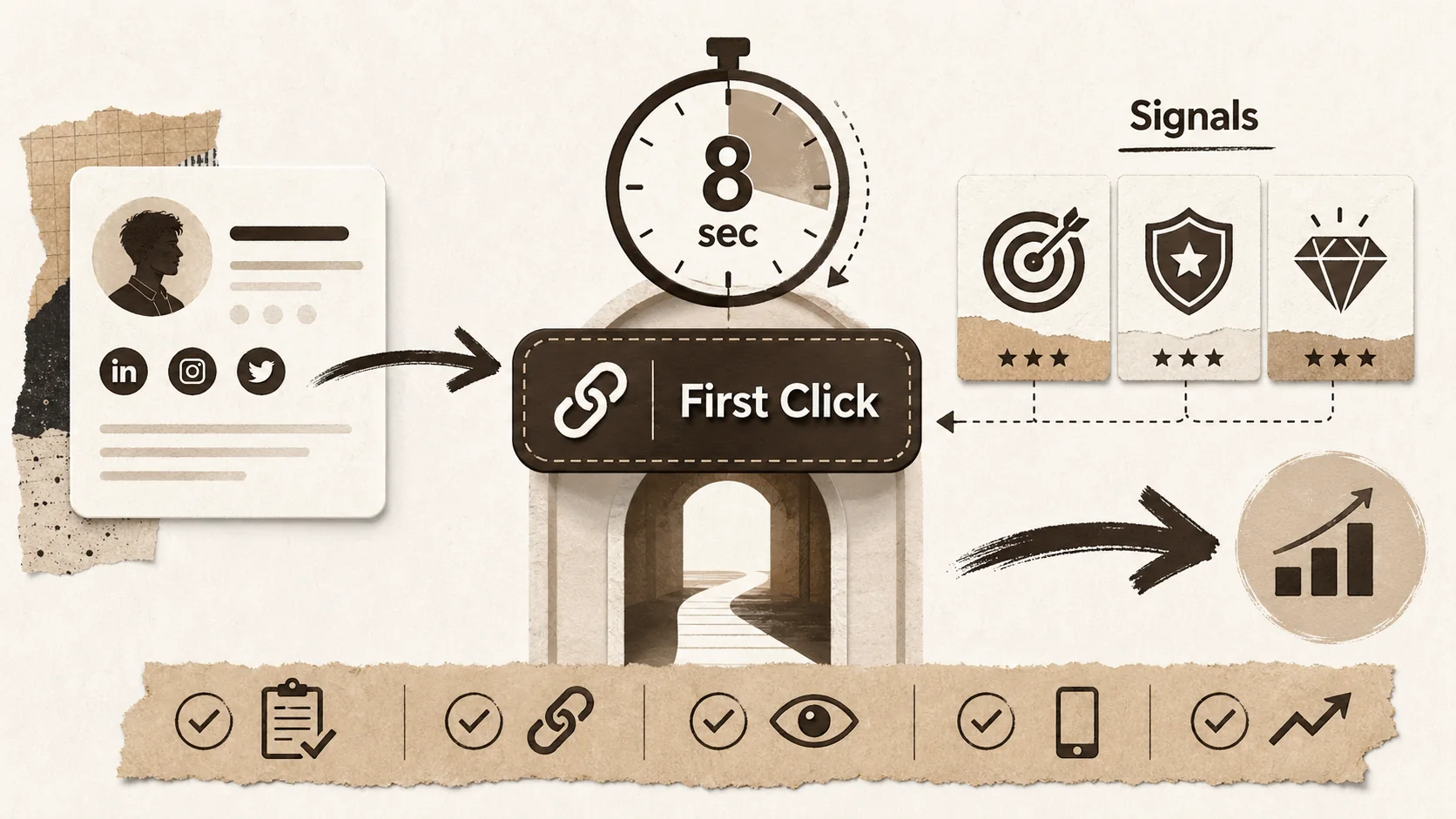
In February 2026, the initial screening process for talent has reached a new level of intensity. Data from leading ATS platforms and industry reports confirms what many job seekers have suspected: the window to make a first impression is not just shrinking—it’s slamming shut. Recruiters and hiring managers, often assisted by AI sourcing tools, now spend an average of just 6 to 8 seconds on a candidate's primary social profile before deciding to engage further or move on.
This isn't about reading your entire career history. It's a high-speed scan for signals: relevance, professionalism, and clear value. Your LinkedIn headline, your Twitter bio, your Instagram profile—these are your billboards. And the single, most critical call-to-action on that billboard is your bio link. This is the "First Click." It’s the gateway from a fleeting glance to genuine consideration. Fail this test, and your application is dead in the water before it even begins.
This article provides a tactical, step-by-step framework to audit, rebuild, and optimize your bio link to not just survive but thrive in the 8-second scan of 2026. We'll move beyond generic advice into actionable strategies that turn your link from an afterthought into your most powerful career asset.
Why the "First Click" is Your Most Valuable Digital Real Estate
Your bio link is the only element on platforms like LinkedIn, GitHub, Dribbble, and Behance where you control the destination -- making it the highest-leverage piece of digital real estate in your job search, according to a 2025 Nielsen Norman Group study on recruiter navigation patterns.
Before we dive into the "how," let's solidify the "why." Your bio link is often the only place on a constrained social media profile where you can direct traffic to a destination you fully control. It's your escape hatch from the platform's limitations.
- The Control Factor: On platforms like Twitter, Instagram, or Dribbble, you cannot format text, embed rich media, or provide deep context. Your bio link is your opportunity to break included and present a curated, professional narrative.
- The Funnel Analogy: Think of your social profile as the top of a funnel. It attracts attention. Your bio link is the narrow spout that guides qualified, interested viewers (recruiters, clients, collaborators) into your world—your portfolio, your project highlights, your case studies.
- The Trust Signal: A generic, unoptimized link (e.g., a lengthy LinkedIn URL) signals a lack of effort and digital savvy. A clean, custom-named link that leads to a polished page immediately communicates professionalism and attention to detail.
In the context of our hub for portfolio strategies, mastering the First Click is the essential first chapter. It's the bridge between being discovered and being remembered.
The 2026 Recruiter Scan: What Are They Looking For in 8 Seconds?
Recruiters evaluate three things in sequence: role alignment (seconds 1-3), credibility signals like a professional headshot and non-generic bio link (seconds 3-5), and a clear value proposition with proof of impact (seconds 5-8) -- a pattern confirmed by Talent Board’s 2025 candidate experience benchmark covering 200,000+ applicants.
To optimize for the scan, you must understand the scanner’s priorities. Based on 2026 hiring data and conversations with talent acquisition leaders, here’s what happens in those critical seconds:
- Role Alignment (Seconds 1-3): Does the profile headline or key bio keywords match the search query or job description? AI tools are flagging this at lightning speed.
- Credibility Signal (Seconds 3-5): Are there immediate indicators of legitimacy? Current company, education, a professional headshot, and—crucially—a non-generic link in the bio.
- Value Proposition (Seconds 5-8): Can they instantly see what you do and the impact you've had? This is where the promise of your bio link becomes vital. They are asking: "If I click this, will it immediately show me proof of work?"
The decision to click your bio link is made in this window. It's a risk-assessment from the recruiter's perspective. They are asking: "Is this click likely to give me the information I need to move this candidate to the 'Yes' pile?"
A dead end (a broken link), a confusing portal (a generic link-in-bio grid with no context), or a lack of immediate relevance will cause them to abandon the process. As we explored in Why Static Links Cost Opportunities in 2026, static, one-size-fits-all links are no longer sufficient. The same pattern appears in our analysis of why 54% of recruiters reject you before reading your resume.
The First Click Audit: Diagnosing Your Bio Link's Health
Audit every professional profile -- LinkedIn, GitHub, Behance, Dribbble -- by checking link text quality, destination page clarity, pathway to proof-of-work, and mobile responsiveness, then triage issues by priority.
Take five minutes and conduct this honest audit. Go to your LinkedIn, Twitter, GitHub, Instagram—any professional profile.
1. The Link Text/URL Itself:
- Is it a raw, ugly URL (e.g.,
linkedin.com/in/john-smith-8a7b6c5d)? - Is it a generic "linktr.ee/yourname" or "biolink/yourname"?
- Or is it a clean, custom, branded link (e.g.,
popout.page/janesmithoryourname.com/work)?
2. The Destination Page:
- First 3-Second Load: What is the absolute first thing a visitor sees? Is it a clear headline with your name and role? Or is it a grid of ambiguous icons?
- Clarity of Purpose: Within 5 seconds, can a visitor understand who you are, what you do, and what you want them to do next (view portfolio, contact you, read your writing)?
- Pathway to Proof: Is your best work—your portfolio, key projects, case studies—immediately accessible and prominent, or is it buried?
- Mobile Experience: Over 70% of profile views happen on mobile. Does your destination page look and function flawlessly on a phone?
If your audit revealed more red flags than green lights, don't worry. The following framework is your blueprint for repair.
The 2026 First Click Optimization Framework
The four phases are: (1) define your goal and target audience, (2) craft an irresistible branded short link with proper Open Graph tags, (3) design an 8-second landing page with a hero section, scannable proof zone, and clear navigation, and (4) iterate with analytics and A/B testing.
This is a four-part framework to transform your bio link from a weak point into your strongest asset.
Phase 1: Strategic Foundation – Define Your Goal & Audience
You cannot optimize for everyone. Before changing a single pixel, answer these questions:
- Primary Goal: Is this link for job seeking (tech, marketing, design), client acquisition (freelance, consulting), or personal branding (creator, speaker)?
- Target Audience: Are you targeting startup founders, Fortune 500 recruiters, indie developers, or marketing directors? The language and priorities on your page will shift accordingly.
- Desired Action: What is the one thing you want most visitors to do? (e.g., "View my software engineering portfolio," "Read my latest case study," "Book a consultation call").
This clarity will inform every subsequent decision, from imagery to copy to layout.
Phase 2: Crafting the Irresistible Link & Preview
The link itself is a preview. Optimize it.
- Use a Custom Short Link: Ditch the long URLs. Use a tool that allows you to create a short, clean, memorable link. Ideally, it should be your name or a clear variant (e.g.,
popout.page/alexchen). This looks professional and is easy to type. - Leverage Link Previews: Many social platforms and messaging apps show a preview (image, title, description) when you paste a link. Ensure your destination page has proper Open Graph (OG) tags configured so this preview looks compelling—not blank or generic.
Phase 3: Designing the 8-Second Landing Page
This is the destination. Its job is to capture the interest earned by the click and convert it into engagement.
- The Hero Section (Above the Fold): This is non-negotiable. Within the first screen view, without scrolling, you must have:
- A professional photo or clean logo.
- Your name and current professional title/headline.
- A one-sentence value proposition: "I build scalable backend systems in Go," "I design brand identities for tech startups," "I write about the future of AI in marketing."
- One primary, bold call-to-action button: "View My Portfolio," "See My Projects," "Download My Resume."
- The Scannable Proof Zone: Immediately follow the hero with your evidence. This could be:
- A featured project carousel with images, titles, and one-line outcomes.
- A "Selected Work" section with 3-4 key projects.
- Client or company logos (if appropriate).
- Crucially, make every item clickable to a deeper dive. You are providing a menu of your best work.
- Clear Navigation & Exit Paths: Don't create a dead-end. Provide clear paths to your full portfolio, your articles, your contact info, and back to your social profiles. A clean navigation header or a simple list of sections works wonders.
For a deeper dive on constructing this proof-centric page, our guide on How to Build a Portfolio That Recruiters Actually Click offers extensive project presentation tactics. If you're a developer, see also our dedicated developer portfolio creation guide for GitHub and code-forward layouts.
Phase 4: Data-Driven Refinement
Optimization is not a one-time task. Use data to iterate.
- Enable Basic Analytics: Use a platform that tells you how many people are clicking your link, where they're coming from, and what they're clicking on within your page. This tells you which projects are resonating and which social profiles are driving traffic.
- A/B Test Your CTA: Try changing the text of your primary button from "My Work" to "View My Projects" or "See My Designs." Small changes can impact conversion.
- Update Relentlessly: Your bio link page should be a living document. Swap in your latest project. Update your headline if you change roles. Add a link to a recent talk or publication. Staleness is a silent killer of opportunity.
Tools & Tactics for 2026
Move beyond basic link grids to a single-page portfolio hub with SEO-optimized Open Graph tags, consistent branding across LinkedIn, GitHub, Behance, and Dribbble, and built-in analytics to measure click-through rates by traffic source.
- Beyond the Basic Link Grid: While simple link aggregators have their place, 2026 demands a more immersive, brand-forward experience. Consider a single-page portfolio site that you can use as your universal bio link. For a full comparison, see our ultimate guide to portfolio builder alternatives.
- The SEO Advantage: A dedicated page on your own domain or a customizable platform can be optimized for search engines. Imagine a recruiter searching for "Python developer fintech portfolio" and finding your bio link page. Tools like Popout are built specifically for this—creating SEO-optimized, beautiful portfolio pages that serve as the perfect bio link destination. Create Your Popout Page
- Integration is Key: Your bio link page should feel like a seamless extension of your social profiles. Use consistent colors, fonts, and tone of voice. Your Behance projects, Dribbble shots, and GitHub contributions should flow naturally from the same visual identity.
Conclusion: Your Click is Your Handshake
In 2026, your bio link is more than a URL; it's a digital handshake. It's the critical transition from a passive profile view to an active exploration of who you are and what you can do. By applying the "First Click" test framework—auditing your current state, defining your goal, crafting a compelling link, building a scannable, proof-positive landing page, and refining with data—you take control of that narrative. For the next step in this journey, learn how to design the second screen experience after the click.
You transform the 8-second recruiter scan from a threat into your greatest opportunity. You ensure that when they do click, they are greeted not with confusion, but with clarity, professionalism, and undeniable evidence of your value. In a competitive market, that's not just an optimization—it's a career superpower.
Ready to build your 8-second-proof gateway? Start by creating a page that puts your best work first, and turn every first click into a lasting impression.
Frequently Asked Questions (FAQ)
Q1: Is a Linktree or similar link-in-bio tool good enough in 2026? A: For casual use, they can be functional. However, for professional purposes like job seeking or client acquisition, they often fall short. They typically offer limited design customization, present links in a generic grid that lacks context, and provide minimal branding or SEO benefits. In an 8-second scan, a recruiter wants to see proof and professionalism immediately, not decipher a list of icons. A dedicated, designed portfolio page is a far more powerful alternative.
Q2: I'm not a designer. How can I create a professional-looking bio link page? A: You don't need to be a designer. The key is to use tools built for this specific purpose. Look for platforms that offer modern, mobile-responsive templates where you can simply drag and drop your content (projects, text, images). Focus on clarity over complexity: a clean template with your photo, a strong headline, and a well-organized project section will outperform a DIY, overly complicated design every time.
Q3: Should my bio link go directly to my full portfolio website or a special landing page? A: In most cases, a special landing page is superior. Your full portfolio site might have a blog, an about page, contact details, etc. A dedicated "hub" or "link" page allows you to curate the first experience. You can place your 3-4 best projects front and center, feature a specific resume, or highlight a current campaign. You control the narrative completely, rather than dropping a visitor onto a homepage and hoping they navigate correctly.
Q4: How often should I update the content on my bio link page? A: Treat it as a living document. A good rule is to review it quarterly. Whenever you complete a significant new project, update your current role, or achieve a new certification, add it. Regular updates signal that you are active, engaged, and growing in your career. Stale content suggests the opposite.
Q5: Can I use the same bio link on all my social platforms (LinkedIn, Twitter, Instagram)? A: Absolutely. In fact, consistency is recommended. It creates a cohesive personal brand and makes you easier to find. However, you can use analytics (if your platform provides them) to see which traffic sources are most valuable. The page itself can be universal, even if the audience from each platform has slightly different interests.
Q6: What's the single most important element on my bio link destination page? A: The "above-the-fold" hero section. This is what visitors see without scrolling. It must, within 3 seconds, answer: 1) Who are you? (Name/Photo), 2) What do you do? (Clear headline), and 3) What can I see/do here? (One prominent, primary Call-to-Action button like "View My Work"). If you get this right, you've successfully passed the initial scan and earned more of their time.
Other Doved Studio projects
Related tools from the same studio you might find useful:
- Ralphable: Generate structured Claude Code skills that iterate until pass/fail criteria are met.
- Glean: Turn scrolling time into a daily action plan. Capture, process, execute.
- Doved Studio: Studio indie derrière cette app et une dizaine d'autres outils.
Written by
popout
Content Team