The 2026 'Portfolio Passport': Why Your Online Presence Needs a Unified Identity to Navigate Global Opportunities


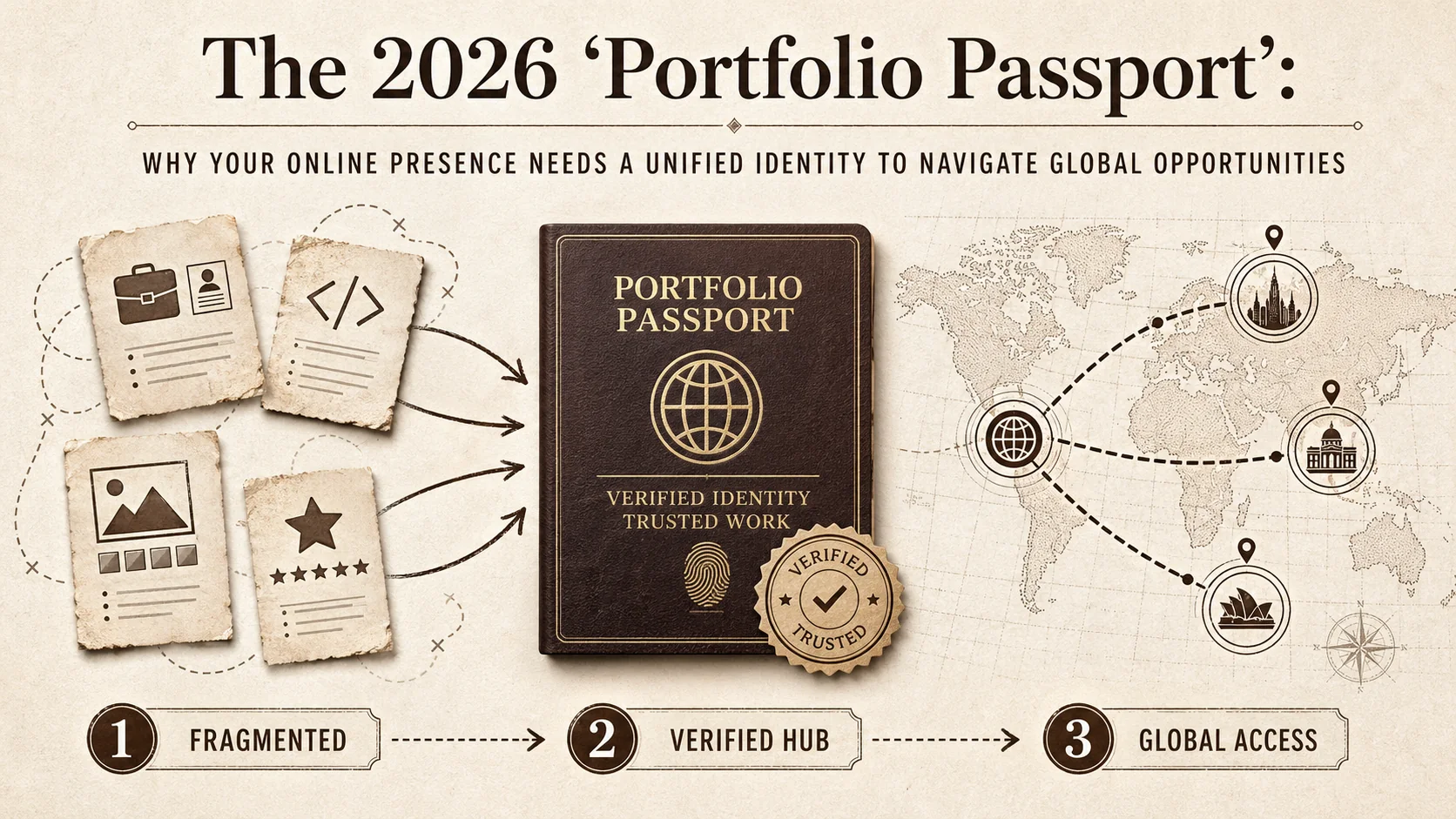
Imagine you're hiring for a remote role. To vet one candidate, you check their LinkedIn, GitHub, personal site, and maybe Behance. You cross-reference names and dates, hoping it all matches up. This scavenger hunt is standard now. It's exhausting for recruiters and makes candidates look disorganized. For global, remote work, this system is broken. The fix is a 'Portfolio Passport'—a single, verifiable hub for all your professional proof. By 2026, this won't be a nice-to-have. It will be how you build trust and get hired.
The Friction of a Fragmented Digital Self
A scattered presence across LinkedIn, GitHub, Behance, and Dribbble creates doubt, wastes recruiter time, and buries your best work behind platform silos.
Our professional identities are split across platforms. LinkedIn holds our resume. GitHub holds our code. A personal site might hold projects. This split creates real problems. I've seen clients hesitate because a freelancer's Upwork hours didn't match the project dates on their own site. Even small discrepancies breed distrust. For hirers, verification is a huge time sink. A 2025 survey by the Global Recruiting Network found 68% of hiring managers say verifying work across scattered profiles is a top-3 pain point (Global Recruiting Network, 2025). For you, great work gets lost. That perfect case study buried on an old blog or a key testimonial hidden in a LinkedIn comment is value no one sees. Fragmentation is the enemy of a strong personal brand. Your brand should be clear and easy to grasp, not a puzzle.
The 2026 Landscape: Why the "Passport" Analogy Fits
W3C Verifiable Credentials and platform-portable data standards are turning the "passport" from analogy into architecture -- a single, cryptographically trusted hub for your entire professional identity.
A passport is a single, trusted document for crossing borders. Your professional identity needs the same trust and portability. Two trends are making this essential.
First, Verifiable Credentials (VCs) are going mainstream. The W3C's VC standard lets you have tamper-proof digital certificates for skills, diplomas, or project completions. Platforms like Credly and Accredible already issue verifiable badges that recruiters can check cryptographically in seconds, without calling your old boss. Second, platforms want portable data. LinkedIn's "skill passports" and GitHub's verified badges show they know walled gardens limit value. They're preparing to read data from your central hub, not just host a piece of it. The ecosystem is forming. The professionals who build their unified hub now will be the first to benefit from this trust-based network. For a related concept on how skills structure enables global mobility, see our piece on the portfolio skills passport.
Core Components of Your Portfolio Passport
A Portfolio Passport contains six components: verified work history, a skill wallet backed by credentials from Credly or Coursera, a project gallery, a unified bio, trust signals, and a live activity feed from GitHub or your blog.
Your passport is a structured, living record of your professional value. It's more than a link aggregator.
| Component | Description | Why It's a "Passport Stamp" |
|---|---|---|
| Verified Work History | Links to verifiable outputs: shipped products, client projects with testimonials, open-source commits. | Moves beyond job titles to proof of execution. |
| Skill & Endorsement Wallet | Skills backed by credentials (like Coursera certs) or peer endorsements that can be checked. | Creates a trusted, auditable skill matrix. |
| Project Portfolio Gallery | Curated case studies. Each should explain the problem, your role, tools, and the outcome. | The core exhibit of what you can do. |
| Unified Bio & Narrative | A consistent "About Me" that ties your experiences into a coherent story. | Provides the narrative glue for your work. |
| Trust Signals & Social Proof | Integrated client testimonials, press mentions, and speaking engagements. | Acts like visa stamps—external validation. |
| Live Activity & Updates | A feed showing recent blog posts, merged pull requests, or completed courses. | Shows your passport is current and active. |
Building this requires an identity-centric mindset. You update your central hub of truth first, which then feeds your other profiles.
The Tangible Benefits: What a Unified Identity Unlocks
A unified Portfolio Passport unlocks five concrete advantages: frictionless one-click applications, SEO-powered discoverability, stronger pay negotiation, Web3-ready portability, and platform-independent reputation control.
Frictionless Applications: Share a rich, pre-vetted profile with one click instead of manually filling forms. Platforms like Popout are built for this. Enhanced Discoverability: A centralized hub with all your keywords and projects is more SEO-friendly. It can become the top result for your name, outranking even your LinkedIn profile. Stronger Negotiating Power: When someone sees the full breadth of your verified work -- GitHub contributions, Behance projects, client testimonials -- you negotiate from demonstrated value. Future-Proofing for New Work Models: In Web3 or DAOs, a verifiable, portable identity is mandatory. Your passport is your key. Reputation Control: If a social media platform changes or you get hacked, your primary professional asset remains safe on your own domain. For a deeper dive on the hub strategy, read our guide on building a powerful personal brand hub. And to understand how proof-of-work elements are replacing traditional references, see portfolio proof of work elements.
How Bad Is the Fragmentation Problem?
54% of recruiters have discarded candidates over conflicting cross-platform details, and the average knowledge worker spreads their identity across 9+ apps -- making fragmentation the single largest hidden barrier to career growth.
A consistent identity matters. 54% of recruiters have discarded a candidate because they couldn't verify online information or found conflicting details across profiles (CareerBuilder Survey, 2024). This isn't just about fraud; it's about confusion. Furthermore, professionals are overwhelmed. The average knowledge worker uses over 9 different apps and platforms for work and networking (Asana, 2025). Managing a separate profile on each is unsustainable. The content you create gets lost. For instance, 41% of hiring managers say a candidate's best work is often hard to find because it's spread across too many places (LinkedIn Talent Solutions, 2024). This isn't a minor inconvenience. It's a structural problem that hides your value and slows your career growth.
Building Your 2026 Portfolio Passport: A Practical Guide
Build your passport in five phases: audit and consolidate, choose a platform, populate with 3-5 key projects, verify and activate with badges from GitHub and Credly, then maintain quarterly.
You can build your passport in five phases. Start small, but start with a central hub.
Phase 1: Audit & Consolidate. List every platform with a professional presence -- LinkedIn, GitHub, Behance, Dribbble, Substack, personal blog. Clean up your name, headline, and photo so they're identical everywhere. For each major role, pick the single best piece of proof -- a live URL, a repo, a case study. Our guide on portfolio authenticity offers a framework for ensuring consistency.
Phase 2: Choose Your "Issuing Authority" (Your Platform). Your passport needs a home you own and control. You need a portfolio builder that showcases work, not just lists links. For developers, specific tactics are key; learn more in our article on how to create a developer portfolio that stands out.
Phase 3: Populate with "Stamps" (Your Content). Start with 3-5 key projects. Use the Problem-Action-Result framework for case studies. Gather proof: testimonials, screenshots, metrics. Write a bio that connects your career dots. What mission ties your work together?
Phase 4: Verify & Activate. Use platform verification badges (like GitHub's). Link to authoritative sources. Connect feeds from your blog or repo to show live updates. Make your passport URL the only link in your social bios, email signature, and resume.
Phase 5: Maintain & Evolve. Review it quarterly. Add new work, refresh projects, update skills. As verifiable credentials become common, add those badges. To see tools that facilitate this, check our analysis of the ultimate guide to portfolio builder alternatives in 2026.
What Tools and Standards Should You Use?
Combine a custom domain, a portfolio builder like Popout, verification layers from Credly and LinkedIn Skill Assessments, and RSS/API integrations to pull live activity from GitHub and your blog.
The right tools make building and maintaining your passport practical. Focus on ownership and interoperability.
Your foundation is a custom domain (yourname.com) or a professional subdomain. This is your owned address. For the build, I recommend tools like Popout, which are designed as central hubs, or frameworks like Next.js for full control. You must integrate verification layers. This includes platform-native badges (LinkedIn Skill Assessments, Top Voice badges) and emerging W3C Verifiable Credentials. Keep an eye on platforms like Credly that issue digital badges. For content, structure projects with clear outcomes. Use numbers: "Increased sign-ups by 15%" or "Managed a $50K budget." This specificity acts as its own proof point. Finally, ensure portability. Use RSS feeds or APIs to pull activity from other platforms (like recent blog posts or GitHub commits) into your hub automatically. This keeps it alive.
The Future is Portable and Verified
The next five years will shift hiring from disposable, platform-locked profiles to owned, verifiable professional identities -- and the professionals who build their Portfolio Passport now will capture that first-mover advantage.
The next phase of professional identity moves from disposable profiles to assets you own. Your Portfolio Passport is your claim to that ownership. For a broader look at how your bio link fits into this picture, see our guide on the 2026 portfolio stack.
It shows you understand the new rules: trust must be built fast, proof beats promises, and in a global market, your ability to present a coherent, verified self is your top asset. The tools exist. The standards are being written. The advantage goes to those who build their passport first. You'll spend less time managing profiles and more time doing work that matters. Start building your unified hub now.
Ready to build your professional passport? Stop managing a dozen profiles. Start building your verified hub. Create Your Popout Page in minutes and move toward a frictionless, global career.
Frequently Asked Questions (FAQ)
Q1: Isn't a Portfolio Passport just a fancy personal website? Not quite. A personal website is a core part, but the "passport" concept stresses verification and portability. It's designed to work with standards like W3C Verifiable Credentials so your skills and achievements can be checked by others. It's built for interoperability.
Q2: I have a LinkedIn profile. Isn't that enough? LinkedIn is a good directory, but you don't own it. Its format is limited. A Portfolio Passport is your owned central hub. LinkedIn becomes one channel that points back to it. You control the narrative, design, and depth.
Q3: How do I "verify" my past work if my old company is gone? Use layered proof. Direct verification is best, but other forms work:
- Client Testimonials: Public recommendations or quotes.
- Tangible Outputs: Links to live apps, published articles, or open-source repos.
- Performance Data: Anonymized metrics ("Grew revenue by 20%").
- Peer Endorsements: Colleagues who confirm your role. Provide enough evidence to build trust.
Q4: Is this only for developers and designers? No. It's for any knowledge professional:
- Writers: Link to published articles and showcase content strategy results.
- Marketers: Present campaign case studies with metrics.
- Consultants: Feature client testimonials and thought leadership.
- Any Job Seeker: Create an evidence-based alternative to a traditional resume.
Q5: How do I keep my Portfolio Passport secure? Choose a platform with reliable hosting and SSL. Use strong passwords and two-factor authentication. Since your hub links to other platforms, secure those accounts too.
Q6: This seems like a lot of work. What's the minimum viable passport? Start small, but start central.
- Secure a professional URL (e.g., using Popout).
- Write a clear bio stating who you are and what you do.
- Add 2-3 best projects with a link to the live work.
- List core skills with one proof link each (e.g., "Python" links to a GitHub repo).
- Add 2-3 testimonials. This core can be built in an afternoon and is far more powerful than scattered links.
Other Doved Studio projects
Related tools from the same studio you might find useful:
- Ralphable: Generate structured Claude Code skills that iterate until pass/fail criteria are met.
- Glean: Turn scrolling time into a daily action plan. Capture, process, execute.
- Doved Studio: Studio indie derrière cette app et une dizaine d'autres outils.
Written by
popout
Content Team